
Nissan Armada 2025-2026 Owner's Manual: How to turn off the VDC system
The Nissan Armada should normally be driven with the Vehicle Dynamic Control (VDC) system activated, as it plays a critical role in maintaining stability, traction, and overall vehicle control in a wide range of driving conditions.
However, in certain situations—such as when the Nissan Armada becomes stuck in mud, deep snow, or loose terrain—the VDC system may limit engine output to reduce wheel spin. In these cases, even if the accelerator pedal is fully pressed, engine power may be reduced. If maximum engine power is required to free the Nissan Armada, temporarily turning off the VDC system may help regain traction.
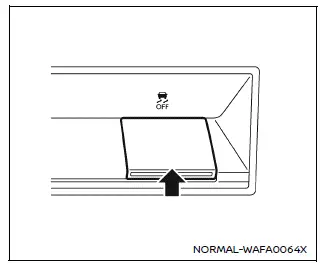
To deactivate the Vehicle Dynamic Control (VDC) system in the Nissan Armada, press the VDC OFF switch.
Once the system is turned off, the VDC OFF indicator light will illuminate on the instrument panel, confirming that stability control functions are disabled.
To restore normal operation, press the VDC OFF switch again or restart the Nissan Armada engine. The system will automatically reactivate to ensure optimal safety.
Brake Force Distribution
During cornering, the Nissan Armada Brake Force Distribution system intelligently adjusts braking force between all four wheels based on steering angle and turning radius. This helps maintain stability and improves control when braking through curves.
This feature enhances the overall braking balance of the Nissan Armada, especially during dynamic driving situations, contributing to safer handling and reduced risk of skidding.
WARNING
- The Nissan Armada VDC system is designed to assist in maintaining vehicle
stability but cannot prevent accidents caused by aggressive steering, excessive
speed, or unsafe driving behavior.
Always reduce speed and drive with caution, especially when cornering or driving on wet, icy, or uneven road surfaces.
- Do not modify the suspension components of the Nissan Armada. Using non-approved
or worn parts such as shocks, struts, springs, stabilizer bars, bushings, or
wheels may negatively impact VDC performance.
In such cases, the warning indicator
 may flash, or both the
 and
and
 indicator lights may illuminate.
 - If brake components such as pads, rotors, or calipers are not NISSAN
recommended or are excessively worn, the Nissan Armada VDC system may not function
correctly, and both the
 and
and
 indicator lights may illuminate.
 - If engine control components are not properly maintained or do not meet
manufacturer standards, both the
 and
and
 indicator lights may illuminate, indicating reduced system performance.
 - When driving the Nissan Armada on steeply banked roads or extreme inclines,
the VDC system may not function as expected, and the
 indicator may flash or both the
 and
and
 indicators may illuminate.
Avoid operating the Nissan Armada in such conditions whenever possible.
- Driving on unstable platforms such as ferries, ramps, elevators, or rotating
surfaces may trigger warning indicators
 and
and
 /
/
 .
.This is normal behavior and not a malfunction. Restart the Nissan Armada engine after returning to stable ground.
- If non-recommended tires or wheels are installed, the Nissan Armada VDC
system may not operate properly, and warning indicators
 ,
,
 and
and
 may illuminate.
 - The Nissan Armada VDC system does not replace the need for proper winter tires or tire chains when driving on snow-covered or icy roads.
 Basic information
The Vehicle Dynamic Control (VDC) system in the Nissan Armada is an advanced
stability and traction management system that continuously monitors driver inputs
and vehicle behavior through multiple ...
 Chassis control
Basic information
The Nissan Armada chassis control system is an advanced electronic module designed
to enhance driving stability and comfort by managing multiple dynamic functions.
Intelligent ...
Other materials:
Braking
Braking action involves perception time and reaction time. Deciding to push the
brake pedal is perception time. Actually doing it is reaction time.
Average driver reaction time is about three-quarters of a second. In that time,
a vehicle moving at 100 km/h (60 mph) travels 20m (66 ft), which co ...
Retained Accessory Power (RAP)
These vehicle accessories may be used for up to 10 minutes after the engine is
turned off:
Audio System
Power Windows
Sunroof
The power windows and sunroof will continue to work for up to 10 minutes or until
any door is opened.
The radio will work when the key is in ON/RUN or ACC/ACC ...
Shock Absorber Replacement
Shock Absorber Replacement
Callout
Component Name
Preliminary Procedure
Raise and support the vehicle. Refer to Lifting and Jacking the
Vehicle.
Remove the tire and wheel assembly. Refer to Tire and Wheel Removal
and ...

0.0068