
Nissan Armada 2025-2026 Owner's Manual: I-FCW system operation
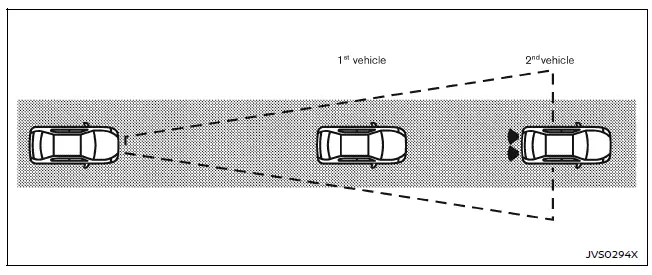
The Nissan Armada I-FCW system becomes active at speeds above approximately 3 MPH (5 km/h), ensuring functionality during most driving scenarios.
When a potential forward collision risk is detected, the Nissan Armada system immediately alerts the driver by flashing the vehicle-ahead detection indicator and emitting a clear audible warning signal, prompting timely driver response.
Turning the I-FCW system ON/OFF
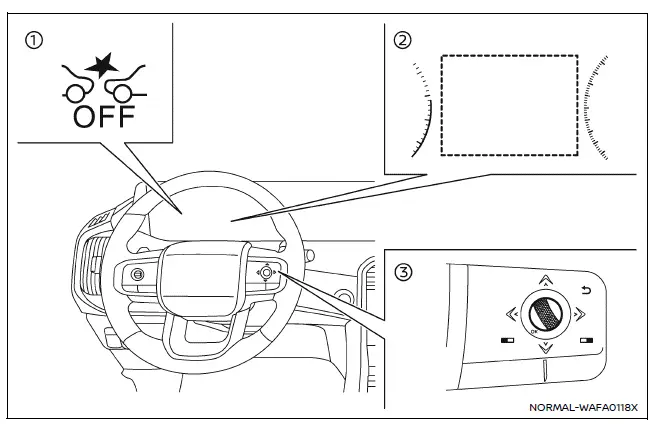
- AEB system OFF warning light (instrument panel)
- Vehicle information display
- Steering-wheel-mounted controls (right side)
Follow these steps to enable or disable the I-FCW system in the Nissan Armada:
1. Press the
 button until "Settings" appears on the vehicle information display, then confirm
using the scroll dial.
button until "Settings" appears on the vehicle information display, then confirm
using the scroll dial.
Use the scroll dial to navigate to "Driver Assistance," then press to confirm your selection.
2. Select "Emergency Brake" and press the scroll dial to turn the system ON or OFF according to your preference.
When the I-FCW system is disabled, the Nissan Armada AEB system OFF warning light (orange) will illuminate to inform the driver.
NOTE:
- The I-FCW system in the Nissan Armada automatically reactivates each time the engine is restarted.
- The I-FCW system is fully integrated with the AEB system and cannot
be controlled independently.
Disabling the AEB system will also disable the I-FCW functionality.
- The I-FCW system cannot be switched ON or OFF while the Nissan Armada is in motion.
 Basic information
WARNING
Failure to carefully follow all warnings and operating instructions related
to the I-FCW system in the Nissan Armada may lead to serious injury or even fatal
accidents.
The Intelligen ...
 I-FCW system limitations
Illustration A
Illustration B
Illustration C
Illustration D
WARNING
The following limitations apply to the Nissan Armada I-FCW system. Ignoring
these limitations may result in s ...
Other materials:
Towing the Vehicle
Notice: Incorrectly towing a disabled vehicle may cause damage. The
damage would not be covered by the vehicle warranty. Do not lash or hook to
the chassis components including the front and rear subframes, suspension control
arms and links during towing and recovery of a disabled vehicl ...
Front Side Door Check Link Replacement
iii!
Front Side Door Check Link Replacement
Callout
Component Name
Preliminary Procedure
Remove the front side door trim panel. Refer to Front Side Door Trim
Replacement.
1
Front Side Door Check ...
Throttle Body Heater Outlet Pipe Replacement (LUW)
Throttle Body Heater Outlet Pipe Replacement
Callout
Component Name
Preliminary Procedure
Drain the cooling system. Refer to Cooling System Draining and Filling.
1
Engine Coolant Air Bleed Hose
...

0.0112