
Chevrolet Sonic Repair Manual: Instrument Panel Knee Bolster Replacement
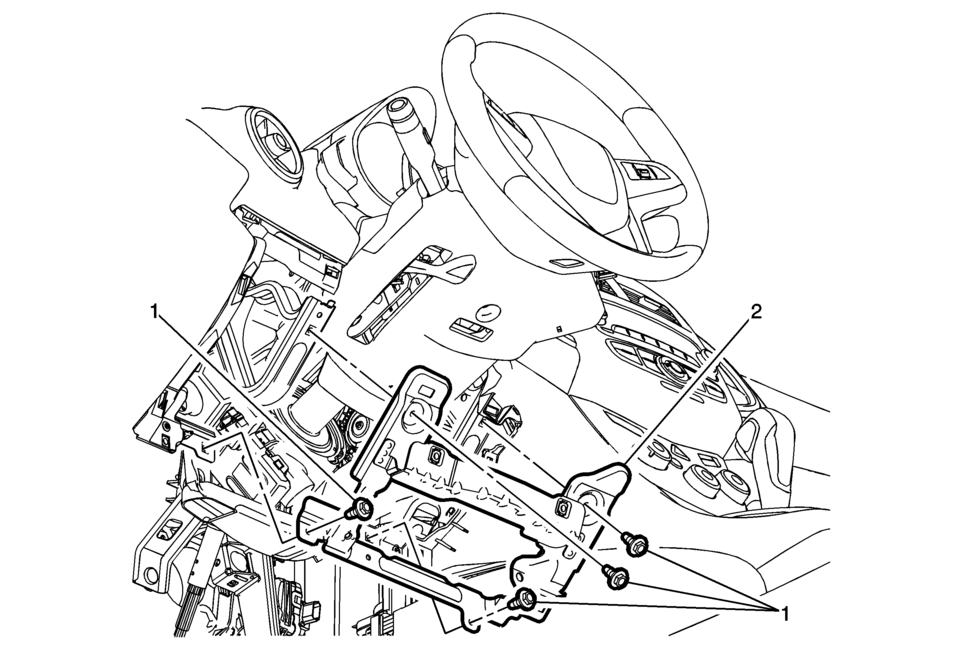
|
Callout |
Component Name |
|---|---|
Preliminary Procedures
|
|
|
1 |
Instrument Panel Knee Bolster Fasteners (Qty:?€‰4) Caution: Refer to Fastener Caution.
9?€‰Y (80?€‰lb?€‰in) |
|
2 |
Instrument Panel Knee Bolster |
 Instrument Panel Upper Trim Panel Replacement - Right Side
Instrument Panel Upper Trim Panel Replacement - Right Side
Callout
Component Name
Preliminary Procedure
Disable the SIR system. Ref ...

Other materials:
Tire Dismounting and Mounting
Caution: Use a tire changing machine in order to dismount tires. Do
not use hand tools or tire irons alone in order to remove the tire from the
wheel. Damage to the tire beads or the wheel rim could result.
Caution: Do not scratch or damage the clear coating on aluminum wheels
wit ...
Radiator Surge Tank Outlet Hose Replacement (LDE LUW)
Radiator Surge Tank Outlet Hose Replacement
Callout
Component Name
Preliminary Procedure
Drain the coolant. Refer to Cooling System Draining and Filling
1
Radiator Surge Tank Outlet Hose Clamps (Qty ...
Rear-facing child restraint installation using LATCH
Before installing a child restraint in the Nissan Armada, carefully review all
warnings and precautions provided in the "Child safety" and "Child restraints" sections
of this manual.
Do not use the LATCH lower anchors if the combined weight of the child and the
child restr ...

0.006