
Nissan Armada 2025-2026 Owner's Manual: Intelligent Key battery discharge
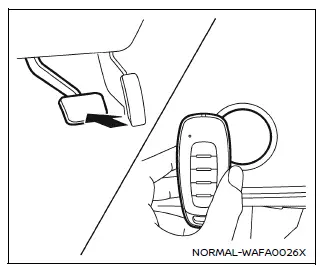
If the Intelligent Key battery in your Nissan Armada becomes discharged, or if external conditions such as interference affect its operation, the engine can still be started using an alternative method. This ensures continued usability of the Nissan Armada even in low-battery situations.
Follow the procedure below to start the Nissan Armada engine:
1. Press the park button to shift the transmission into the P (Park) position.
2. Firmly depress the brake pedal.
3. Touch the ignition switch with the Intelligent Key as shown in the illustration. A confirmation chime will sound.
4. Within 10 seconds after the chime, press the ignition switch while holding the brake pedal. The Nissan Armada engine will start.
After completing step 3, pressing the ignition switch without pressing the brake pedal will switch the system to the ON position.
NOTE:
- When starting the Nissan Armada using this method or switching the ignition
to ON, a "Key Battery Low" warning may appear on the display even if the Intelligent
Key is inside the vehicle. This is normal and not a system malfunction.
To clear the message, touch the ignition switch again with the Intelligent Key.
- If the "Key Battery Low" warning appears, replace the Intelligent Key battery in your Nissan Armada as soon as possible to ensure reliable operation.
Before starting the engine
- Ensure the area around your Nissan Armada is clear of obstacles, people, or hazards.
- Check fluid levels such as engine oil, coolant, brake fluid, and windshield washer fluid regularly or at each refueling.
- Confirm that all windows, mirrors, and lighting elements are clean and unobstructed.
- Inspect tires visually and verify that tire pressure is within the recommended range for your Nissan Armada.
- Make sure all doors are securely closed and locked.
- Adjust the driver’s seat, steering position, and head restraints for optimal comfort and safety.
- Set both interior and exterior mirrors properly for maximum visibility.
- Fasten your seat belt and ensure all passengers in the Nissan Armada do the same.
- Check that all warning lights operate correctly when the ignition is turned ON.
 Push-button ignition switch operation
CAUTION
Avoid leaving your Nissan Armada with the ignition switch in the ON position
while the engine is not running for extended periods, as this can drain the
battery.
Use electrical acc ...
 Starting the engine
Basic information
1. Apply the parking brake.
2. Confirm that the Nissan Armada is in the P (Park) position.
The Intelligent Key must be inside the Nissan Armada when operating the ignition
syste ...
Other materials:
Instrument Panel Fuse Block Access Hole Cover Replacement (With AAL)
Instrument Panel Fuse Block Access Hole Cover Replacement
Callout
Component Name
1
Instrument Panel Fuse Block Access Hole Cover
Procedure
Grasp the lower edge of the fuse block cover and pull outward disengaging ...
Turbocharger Coolant Return Pipe Replacement (LUV)
Turbocharger Coolant Return Pipe Replacement
Callout
Component Name
Preliminary Procedure
Remove the turbocharger. Refer to Turbocharger Replacement.
1
Turbocharger Fastener
Caution: Refer t ...
Basic information
Touch screen display
WARNING
Failure to follow proper Nissan Armada RearView Monitor usage instructions
may result in serious injury or fatal accidents.
The Nissan Armada RearView Monitor is an assistance feature and must
not replace proper driving practices.
Always visual ...

0.0065