
Nissan Armada 2025-2026 Owner's Manual: Basic information
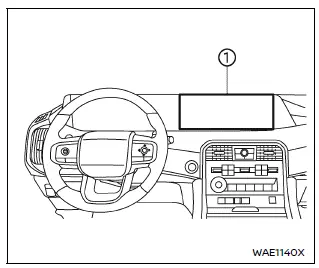
- Touch screen display
WARNING
- Failure to follow proper Nissan Armada RearView Monitor usage instructions may result in serious injury or fatal accidents.
- The Nissan Armada RearView Monitor is an assistance feature and must
not replace proper driving practices.
Always visually check surroundings, use mirrors, and look behind before reversing.
- The system is designed to help detect large stationary objects behind the Nissan Armada and reduce the risk of vehicle damage.
- The displayed distance and width guidelines are for reference only and
are most accurate on level surfaces.
Actual distances may differ from what is shown on the screen.
CAUTION
When cleaning the Nissan Armada rear camera, avoid scratching or damaging the lens, as this may reduce image clarity.
The Nissan Armada RearView Monitor automatically activates when the transmission is shifted into R (Reverse), providing a live rear view on the display.
The audio system will continue to operate normally while the Nissan Armada RearView Monitor is active, ensuring uninterrupted entertainment and system functionality.
The Nissan Armada integrated monitor and multimedia systems are designed to combine convenience, safety, and advanced technology, delivering a modern and intuitive driving experience.
 RearView Monitor
...
 RearView Monitor system operation
The Nissan Armada RearView Monitor system utilizes a rear-mounted camera 1, positioned
just above the license plate, to provide a clear and wide-angle view behind the
vehicle.
To activate the ...
Other materials:
Manual Transmission
The vehicle may be equipped with a 5-speed or 6-speed manual transmission.
Caution
Shifting the vehicle initially into any gear other than 1 (First) or R (Reverse)
can damage the clutch. Shift the manual transmission in the proper sequence, and
time the gear shifting with the accelerator to ...
Filling a Portable Fuel Container
Warning
Filling a portable fuel container while it is in the vehicle can cause fuel
vapors that can ignite either by static electricity or other means. You or others
could be badly burned and the vehicle could be damaged. Always:
. Use approved fuel containers.
. Remove the container from ...
Gear Position Sensor Replacement
Gear Position Sensor Replacement
Callout
Component Name
Preliminary Procedure
Unclip the engine control module (ECM) and bracket from the battery tray.
1
Gear Position Sensor Magnet Bolt
...

0.0061