
Chevrolet Sonic Repair Manual: Liftgate Emblem/Nameplate Replacement (Hatchback)
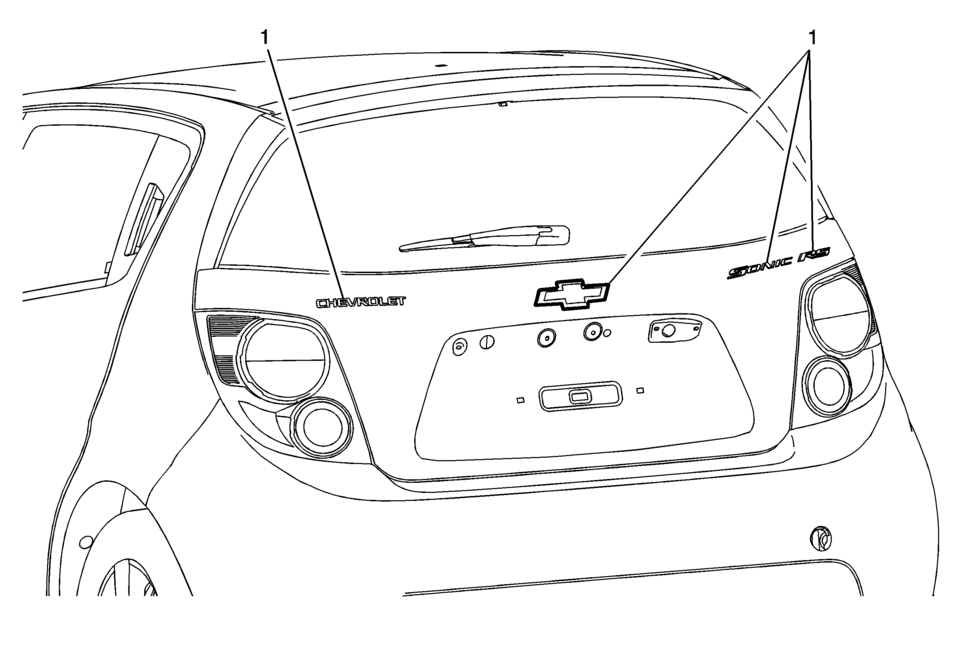
|
Callout |
Component Name |
|---|---|
|
1 |
Liftgate Emblem/Nameplate Assembly Caution: Refer to Exterior Trim Emblem Removal Caution.
|
 Exterior Trim Emblem Removal Caution
Caution: Use a plastic, flat-bladed tool to prevent paint damage when
removing an emblem/name plate.
...
 Paint Gauges
Paint thickness gauges measure the total thickness of the vehicle finish. It
is important to accurately measure the thickness of the finish on each vehicle as
the thickness of the finish will vary ...
Other materials:
Engine Oil
To ensure proper engine performance and long life, careful attention must be
paid to engine oil. Following these simple, but important steps will help protect
your investment:
Always use engine oil approved to the proper specification and of the proper
viscosity grade. See “Selecting th ...
Body Control System Description and Operation
The body control system consists of the body control module (BCM), communications,
and various input and outputs. Some inputs, outputs and messages require other modules
to interact with the BCM. The BCM also has discrete input and output terminals to
control the vehicle's body functions. ...
Camshaft Position Actuator Adjuster Installation
Special Tools
EN-6340 Camshaft Adjuster Locking Tool
EN-6628-A Camshaft Locking Tool
EN-45059 Angle Meter
For equivalent regional tools, refer to Special Tools.
Note: Note the arrows.
Turn the camshaft by the hexagon until the groove on the end of the camshafts
is ...

0.0057