
Chevrolet Sonic Repair Manual: Manual Transmission Shift Lever and Selector Lever Cable Replacement
- Removal Procedure
-
- Remove the battery tray. Refer to Battery Tray Replacement.
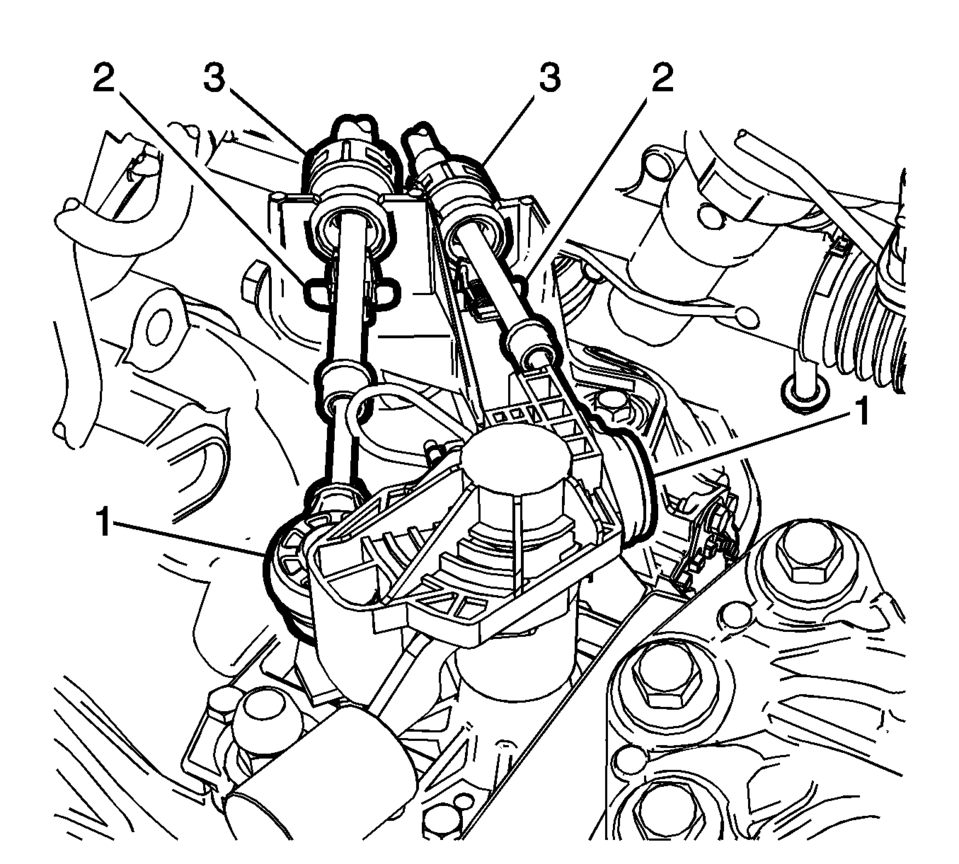
- Disconnect the shift lever and selector cable ends (1) from the transmission shift lever and selector levers.
- Pull the cable retainers (2) to release the shift lever and selector cable from the shift lever and selector cable bracket.
- Disconnect the shift lever and selector cables (3) from the shift lever and selector cable bracket.
- Remove the floor console. Refer to Front Floor Console Replacement.
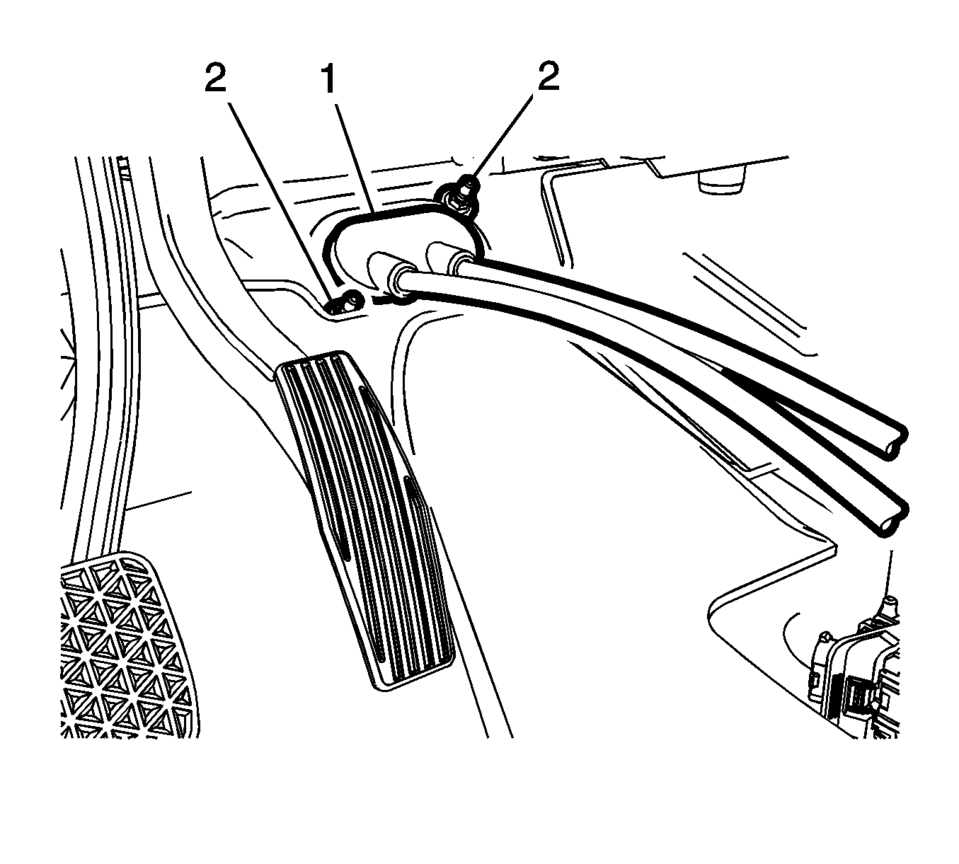
- Move the floor carpet in order to get access to the gear shift lever and selector cable grommet (1).
- Remove the grommet nuts (2).
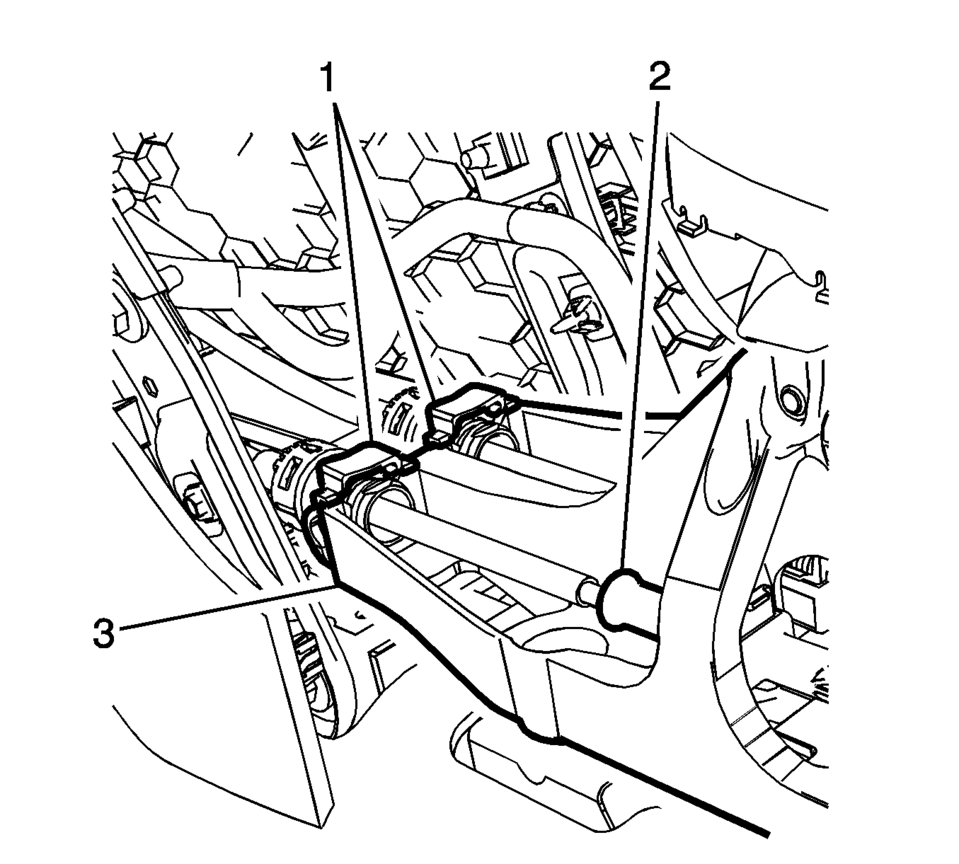
- Lift both cable adjustment retainers (1), one for each cable, to release the shift lever and selector cable.
- Pull the shift lever and selector cable retainers (1) from the transmission control assembly (3)
- Remove the shift lever and selector cable from the shift lever and selector control.
- Pull the shift lever and selector cable assembly through the cowl into the passenger compartment.
- Remove the shift lever and selector cable assembly from the vehicle.
\i

.1
- Installation Procedure
-
- Position the shift lever and selector cable assembly in the vehicle.
- Gently pull the shift lever and selector cable assembly through the cowl into the engine compartment.
- Connect the shift lever and selector cable ends (1) to the transmission shift lever and selector lever.
- Install the shift lever and the selector lever cable (3) to the shift lever and selector lever cable bracket.
- Move the floor carpet in order to get access to the shaft lever and selector lever cable grommet (1).
- Install the grommet nuts and tighten to 9 Y
(80 lb in)
- Connect the shift lever and selector lever cables to the shaft and selector control adjusters (2).
- Install the shift lever and selector lever cable retainers (1) to the transmission control (3).
- Press down and Lock both cable adjustment retainers (1) one for each cable, to adjust the shift lever and selector lever cable.
- Adjust the shift lever and selector lever cables. Refer to Manual Transmission Shift Lever Cable Adjustment.
- Install the floor console. Refer to Front Floor Console Replacement.
- Install the battery tray. Refer to Battery Tray Replacement.
- Verify correct operation of the transmission control assembly.
\i
Caution:
Refer to Component Fastener Tightening Caution.
.1
 Manual Transmission Shift Lever and Selector Lever Cable Adjustment
Remove the floor console. Refer to
Front Floor Console Replacement.
Lift upward and disengage (do not remove) both cable lock
adjusters (1) to release the internal cable asse ...
 Manual Transmission Shift Lever and Selector Lever Cable Replacement
Removal Procedure
Remove the battery tray. Refer to
Battery Tray Replacement.
Disconnect the shift lever and selector lever cable
end (1) from the transmissio ...
Other materials:
Cruise Control
: Press to turn the cruise control
system on and off.
RES/+: Move the thumbwheel up briefly to make the vehicle resume to a previously
set speed or hold upwards to accelerate. If cruise control is already active, use
to increase vehicle speed.
SET/−: Move the thumbwheel down briefly ...
Fuel Tank Draining
Warning: Refer to Gasoline/Gasoline Vapors
Warning.
Note: The fuel tank must be drained with a suitable, commercially-available
fuel removal unit and suction hose - follow safety regulations and national
legislation. The fuel tank is fitted with a refill limit float valv ...
Head restraints/headrests
Basic information
The head restraints/headrests in the Nissan Armada are an essential part of the
overall safety system, designed to work together with seat belts and airbags to
provide enhanced protection for occupants. Proper use and adjustment of head restraints
in the Nissan Armada can si ...

0.0051