
Chevrolet Sonic Repair Manual: Neutral - Engine Running (Gen 2)
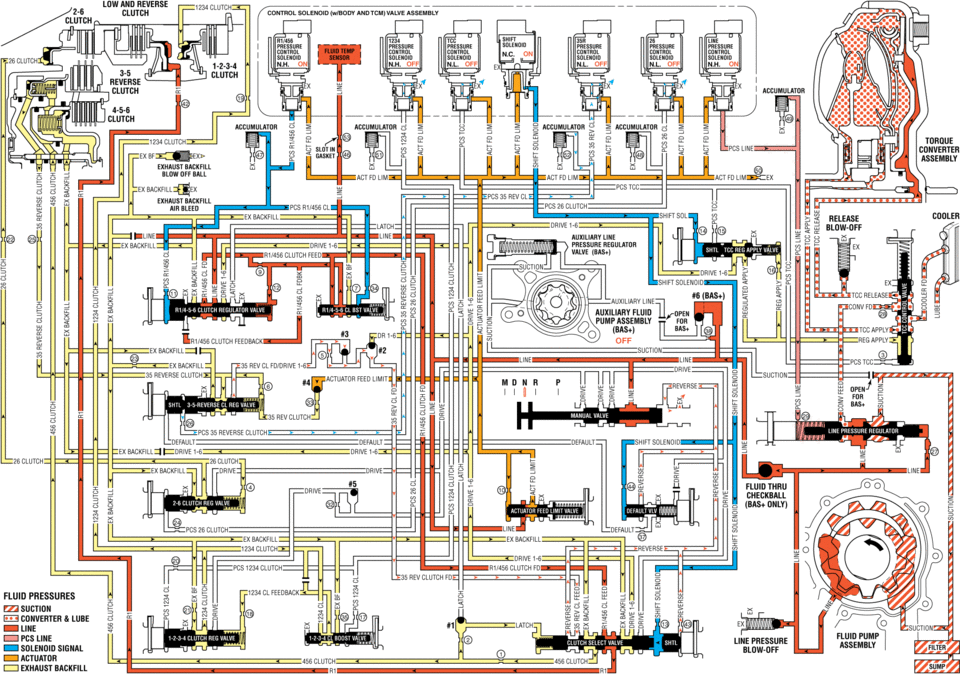
When the gear selector is moved to the Neutral (N) position, the hydraulic and electrical system operation is identical to Park (P) range. However, if Neutral is selected after the vehicle was operating in Reverse (R), the normally-low 35R pressure control solenoid is commanded OFF and the following changes would occur in the hydraulic system.
- 3-5 Reverse Clutch Releases
-
Manual Valve
The manual valve is moved to the Neutral position and blocks line pressure from entering the reverse fluid circuit. Reverse fluid, from the 3-5-reverse clutch regulator valve, the clutch select valve, and the default override valve is opened to an exhaust passage at the manual valve.
35R Pressure Control Solenoid
The 35R PC solenoid is commanded OFF allowing PCS 35 reverse clutch fluid from the 3-5-reverse clutch regulator valve to exhaust.
3-5-Reverse Clutch Regulator Valve
PCS 35 reverse clutch fluid exhausts, allowing 3-5-reverse clutch regulator valve spring force to move the 3-5-reverse clutch regulator valve to the released position. This allows exhausting 35 reverse clutch fluid pressure to pass into the exhaust backfill circuit in order to assist the 3-5-reverse clutch piston spring to quickly release the 3-5-reverse clutch.
3-5-Reverse Clutch
3-5-reverse clutch spring force, assisted by exhaust backfill pressure, moves the 3-5-reverse clutch piston to release the 3-5-reverse clutch plates and force 35 reverse clutch fluid to exhaust from the 3-5-reverse and 4-5-6 clutch housing assembly. The exhausting 35 reverse clutch fluid pressure is routed to the 3-5-reverse clutch regulator valve where it enters the exhaust backfill circuit.
Clutch Select Valve
When reverse fluid exhausts from the clutch select shuttle valve, shift solenoid fluid continues to hold the clutch select valve against clutch select valve spring force allowing 35 reverse clutch feed fluid to exhaust into the reverse circuit.
- Neutral ?Engine Running ?#8201;Gen 2/Hybrid
ldw and reverse clutcu2_ ni/i5 pres pre press pressure n.h. un off off off aceumhlatgr clutch:i- id (a tdrdue converter assembly exhaust act fd um fd ex exnaust backfill pcs clutch ex backhll release cddleh ex backhll clutch fffd (bas+) tcc release cow fd auxiliary fluid /-open (am) clutch feedback off ex suctiun reverse clutch actuator -r sun 35hfv clutch pcs reverse clutch default drive clutch: fluid thru chfckdall only feed pcszg clutch exbackhll clutch: reverse pcs clutch clutch rev clutch fluid pressures sucnou converter lube latch line pressure solenoid signal clutch clutch :i exhaust backfill
 Neutral - Engine Running (Gen 1)
When the gear selector is moved to the Neutral (N) position, the hydraulic and
electrical system operation is identical to Park (P) range. However, if Neutral
is selected after the vehicle was ope ...
 Output Speed Sensor Replacement
Output Speed Sensor Replacement
Callout
Component Name
Preliminary Procedure
Remove the control valve body. Refer to Control
...
Other materials:
Front Fog Lamp Bulb Replacement
Front Fog Lamp Bulb Replacement
Callout
Component Name
Preliminary Procedure
Remove either the left front or right front wheelhouse liner. Refer
to Front Wheelhouse Liner Replacement.
Disconnect the electrical connector t ...
Tire Pressure Monitoring System (TPMS)
Basic information
For optimal safety and performance of your Nissan Armada, each tire—including
the spare tire (if equipped)—should be inspected at least once a month when cold
and inflated according to the manufacturer’s recommended pressure values listed
on the vehicle placard or tire ...
Driver Monitor (ProPILOT Assist 2.1)
Basic information
In the Nissan Armada equipped with ProPILOT Assist 2.1, the Driver Monitor system
plays a critical role in ensuring driver awareness and safety. Using a driver-facing
camera mounted on the steering column, the system continuously evaluates the driver’s
attentiveness by ana ...

0.0076