
Chevrolet Sonic Owner's Manual: Passenger Airbag Status Indicator
The vehicle has a passenger sensing system. See Passenger Sensing System for important safety information. The instrument panel has a passenger airbag status indicator.
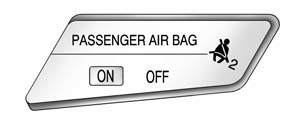
United States
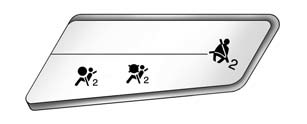
Canada
When the vehicle is started, the passenger airbag status indicator will light ON and OFF, or the symbol for on and off, for several seconds as a system check. Then, after several seconds, the status indicator will light either ON or OFF, or the on or off symbol to let you know the status of the front outboard passenger frontal airbag and knee airbag (if equipped).
If the word ON or the on symbol is lit on the passenger airbag status indicator, it means that the front outboard passenger frontal airbag and knee airbag (if equipped) are allowed to inflate.
If the word OFF or the off symbol is lit on the passenger airbag status indicator, it means that the passenger sensing system has turned off the front outboard passenger frontal airbag and knee airbag (if equipped).
If, after several seconds, both status indicator lights remain on, or if there are no lights at all, there may be a problem with the lights or the passenger sensing system. See your dealer for service.
Warning
If the airbag readiness light ever comes on and stays on, it means that something may be wrong with the airbag system. To help avoid injury to yourself or others, have the vehicle serviced right away. See Airbag Readiness Light for more information, including important safety information.
 Airbag Readiness Light
This light shows if there is an electrical problem with the airbag system. The
system check includes the airbag sensor(s), passenger sensing system, the pretensioners
(if equipped), the airbag mod ...
 Charging System Light
This light will come on briefly when the ignition is turned on, and the engine
is not running, as a check to show it is working.
It should go out when the engine is started. If it stays on, or co ...
Other materials:
Fuel Tank Replacement
Removal Procedure
Disconnect the battery negative cable. Refer to Battery Negative Cable
Disconnection and Connection.
Relieve the fuel pressure. Refer to Fuel Pressure Relief.
Drain the fuel Tank. Refer to Fuel Tank Draining.
Lift and support the vehicle. Refer to Lifti ...
Transmission Fluid Pump, Front Differential Carrier Baffle, and Front Differential
Ring Gear Installation (6T30)
Transmission Fluid Pump, Front Differential Carrier Baffle, and Front
Differential Ring Gear Installation
Callout
Component Name
1
Torque Converter and Differential Housing Seal
2
Fluid Pu ...
Interior lights
Basic information
CAUTION
In the Nissan Armada, avoid leaving interior lights switched on for extended
periods when the engine is not running, as this may lead to battery discharge.
Always switch off all interior lighting before leaving the Nissan Armada
to preserve battery life and ens ...

0.0052