
Nissan Armada 2025-2026 Owner's Manual: Rear window defroster and outside mirror defroster
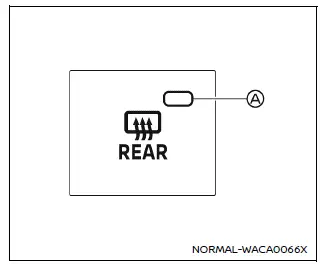
Example
In the Nissan Armada, the rear window and outside mirror defroster switch is conveniently located on the front climate control panel for quick and easy access.
To clear fog or frost from the rear window and outside mirrors in the Nissan Armada, start the engine and press the defroster switch. Once activated, the indicator light A will illuminate, confirming that the system is operating.
Press the switch again to manually deactivate the defroster. Otherwise, the Nissan Armada system will automatically turn off after approximately 20 minutes to conserve energy.
This feature ensures improved rear visibility and safer driving in cold or humid weather conditions.
CAUTION
When cleaning the interior surface of the rear window in the Nissan Armada, handle it carefully to avoid scratching or damaging the embedded defroster lines, as this may affect performance.
 Wiper and washer switch
Basic information
WARNING
In the Nissan Armada, using the washer system in freezing temperatures may
cause the fluid to freeze on the windshield, significantly reducing visibility.
Always warm t ...
 Windshield deicer
Example
The Nissan Armada windshield deicer is specifically designed to remove ice buildup
from the lower windshield area, especially when wiper blades are frozen to the glass.
To activate the ...
Other materials:
Front Brake Rotor Replacement
Special Tools
CH-41013 Rotor Resurfacing Kit
CH-42450-A Wheel Hub Resurfacing Kit
For equivalent regional tools, refer to Special Tools.
Removal Procedure
Warning: Refer to Brake Dust Warning.
Raise and support the vehicle. Refer to Lifting and Jacking the Vehicle.
...
Fuel Tank Replacement
Removal Procedure
Disconnect the battery negative cable. Refer to Battery Negative Cable
Disconnection and Connection.
Relieve the fuel pressure. Refer to Fuel Pressure Relief.
Drain the fuel Tank. Refer to Fuel Tank Draining.
Lift and support the vehicle. Refer to Lifti ...
System maintenance
Example
Basic information
The two radar sensors A for the I-BSI system are located near the rear bumper.
Always keep the area near the radar sensors clean.
The radar sensors may be blocked by temporary ambient conditions such as snow,
splashing water, mist or fog.
The blocked condition ma ...

0.0049