
Nissan Armada 2025-2026 Owner's Manual: Wiper and washer switch
Basic information
WARNING
In the Nissan Armada, using the washer system in freezing temperatures may cause the fluid to freeze on the windshield, significantly reducing visibility. Always warm the glass using the defroster before activating the washer system to ensure safe driving conditions.
CAUTION
- Do not operate the washer continuously for more than 30 seconds in the Nissan Armada to prevent system damage.
- Never use the washer system if the reservoir is empty, as this may damage the pump.
- Avoid filling the Nissan Armada washer reservoir with concentrated fluid
without dilution.
Some alcohol-based washer fluids may stain exterior components if spilled during refilling.
- Always pre-mix washer fluid with water according to manufacturer recommendations before adding it to the Nissan Armada reservoir. Do not mix directly inside the tank.
If the Nissan Armada windshield wipers stop due to snow or ice buildup, this is a protective feature to prevent motor damage. Turn the wiper switch OFF, clear the obstruction, and after approximately one minute, reactivate the system.
Windshield wiper and washer operation
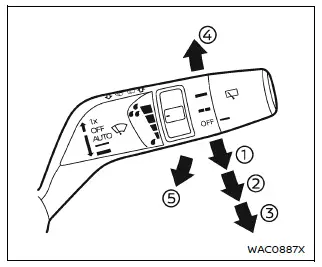
The Nissan Armada windshield wiper and washer system operates when the ignition switch is in the ON position, ensuring full functionality during vehicle operation.
Move the control lever downward to select the desired wiping mode in the Nissan Armada:
- AUTO - activates the rain-sensing automatic wiper system.
- Low - continuous operation at low speed.
- High - continuous operation at high speed.
- Mist - a single wipe for quick cleaning.
To activate the washer in the Nissan Armada, pull the lever toward you until sufficient washer fluid is sprayed onto the windshield. The wipers will automatically perform several cycles.
Wiper drip wipe system:
The Nissan Armada includes a drip wipe function, which performs an additional wipe approximately 3 seconds after washer use to remove residual fluid and improve visibility.
Rain-sensing auto wiper system
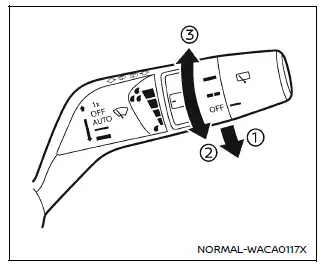
Basic information
The Nissan Armada rain-sensing wiper system automatically adjusts wiping speed based on detected rainfall and vehicle speed using a sensor mounted at the top of the windshield.
To activate AUTO mode in the Nissan Armada, move the lever to position 1. The wipers will perform an initial sweep.
Sensitivity can be adjusted using the control knob:
- High - increased sensitivity for light rain detection
- Low - reduced sensitivity for heavier rainfall conditions
To deactivate AUTO mode in the Nissan Armada, move the lever to OFF or select Low/High manual operation.
CAUTION
Do not touch the rain sensor area when the Nissan Armada wiper system is set to AUTO and the ignition is ON. Unexpected activation may occur, potentially causing injury or damage.
- The Nissan Armada rain sensor may trigger unintentionally if dirt, oil, insects, or moisture accumulate on the windshield.
- The system may not activate if rain does not directly reach the sensor area.
- Water-repellent coatings may alter sensor response, causing faster wiper speeds.
- Always disable AUTO mode before entering a car wash.
- At low speeds (below approximately 5 MPH / 8 km/h) and in Neutral, the system may not operate.
- Using genuine Nissan Armada wiper blades is recommended for optimal performance.
How to enable/disable the rain-sensing auto wiper system
The Nissan Armada allows activation or deactivation of the rain-sensing system through the vehicle information display settings.
Rear window wiper and washer operation
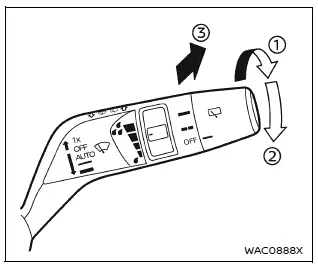
If the rear wiper in the Nissan Armada stops due to snow or debris, switch it OFF, clear the obstruction, and restart the system after approximately one minute.
The Nissan Armada rear wiper operates when the ignition is ON.
Rotate the control switch clockwise from OFF to select operation mode:
- Intermittent - automatic periodic wiping.
- Low - continuous low-speed operation.
Push the switch forward to activate the washer; the Nissan Armada rear wiper will perform several cycles automatically.
Rear window wiper service position:
With the engine OFF (Auto ACC active), quickly push the switch forward twice within 0.75 seconds to move the Nissan Armada rear wiper into service position.
To return it to normal, rotate the switch or push it forward again.
Reverse Link feature:
When the front wipers are active and the Nissan Armada is shifted into Reverse (R), the rear wiper automatically engages to improve rear visibility.
NOTE:
The Reverse Link feature in the Nissan Armada can be disabled through system settings if desired.
 Security systems
Basic information
The Nissan Armada is equipped with two primary security systems designed to enhance
vehicle protection:
Vehicle security system
NISSAN Vehicle Immobilizer System
Vehi ...
 Rear window defroster and outside mirror defroster
Example
In the Nissan Armada, the rear window and outside mirror defroster switch is
conveniently located on the front climate control panel for quick and easy access.
To clear fog or frost fr ...
Other materials:
Communication Interface Module Battery Replacement
Communication Interface Module Battery Replacement
Callout
Component Name
Preliminary Procedure
Remove the instrument panel lower compartment. Refer to
Instrument Panel Lower Compartment Replacement
1
...
Hood Hinge Replacement
Hood Hinge Replacement
Callout
Component Name
Preliminary Procedures
Remove the hood. Refer to Hood Replacement.
Remove the front fender. Refer to Front Fender Replacement.
1
Hood Hinge Bolt (Q ...
Rear Side Door Window Replacement (Hatchback)
Rear Side Door Window Replacement
Callout
Component Name
Warning: Refer to Glass and Sheet Metal Handling Warning.
Preliminary Procedures
Remove the rear side door trim panel. Refer to Rear Side Door Trim
...

0.0058