
Chevrolet Sonic Repair Manual: Communication Interface Module Battery Replacement
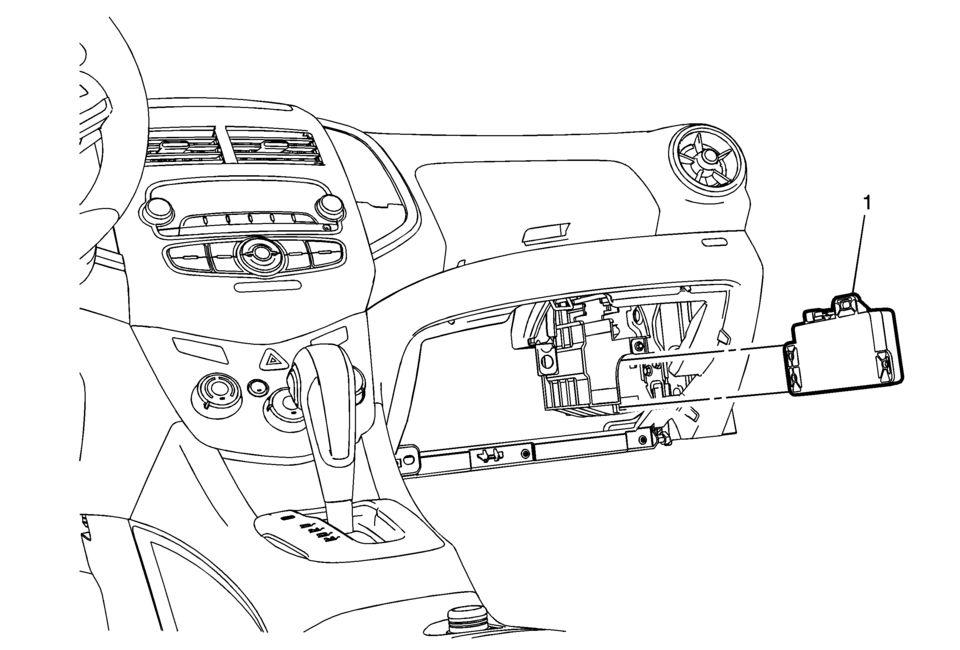
|
Callout |
Component Name |
|---|---|
|
Preliminary Procedure
Remove the instrument panel lower compartment. Refer to Instrument Panel Lower Compartment Replacement |
|
|
1 |
Communication Interface Module Battery Procedure
|
 Bluetooth (Overview)
For vehicles equipped with Bluetooth capability, the system can interact with
many cell phones, allowing:
Placement and receipt of calls in a hands-free mode.
Sharing of the cell phone’s ad ...
 Communication Interface Module Bracket Replacement
Communication Interface Module Bracket Replacement
Callout
Component Name
Preliminary Procedure
Remove the instrument panel low ...
Other materials:
Safety System Check
Now and then, check that the safety belt reminder light, safety belts, buckles,
latch plates, retractors, and anchorages are all working properly. Look for any
other loose or damaged safety belt system parts that might keep a safety belt system
from doing its job. See your dealer to have it re ...
When to Change Engine Oil
This vehicle has a computer system that indicates when to change the engine oil
and filter. This is based on a combination of factors which include engine revolutions,
engine temperature, and miles driven. Based on driving conditions, the mileage at
which an oil change is indicated can vary co ...
Radio Rear Side Door Speaker Replacement
Radio Rear Side Door Speaker Replacement
Callout
Component Name
Preliminary Procedure
Remove the rear side door trim. Refer to Rear
Side Door Trim Replacement.
1
Radio Rear Side Door Speaker Bol ...

0.0046