
Chevrolet Sonic Repair Manual: Steering Wheel Adjustment
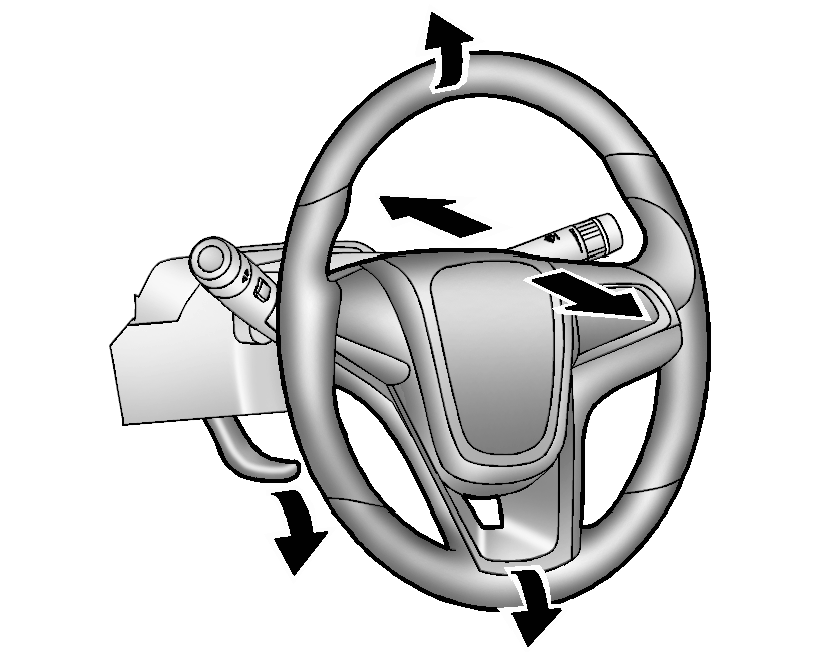
To adjust the steering wheel:
- Pull the lever down.
- Move the steering wheel up, down, forward, and backward.
- Pull the lever up to lock the steering wheel in place.
Do not adjust the steering wheel while driving.
 Driver Information Center (DIC)
The DIC displays information about your vehicle. It also displays warning messages
if a system problem is detected. See Vehicle Messages. All messages appear in the
DIC display in the instrument c ...
 Vehicle Personalization
Personalization Menu (Radio without Touchscreen)
Use the audio system controls to access the personalization menus for customizing
vehicle features.
The following are all possible perso ...
Other materials:
Front Wheelhouse Liner Inner Front Extension Replacement (Right Side, LUV)
Front Wheelhouse Liner Inner Front Extension Replacement
Callout
Component Name
Preliminary Procedure
Remove the tire and wheel assembly. Refer to Tire and Wheel Removal
and Installation.
Remove the front fascia opening l ...
Rear Side Door Window Regulator Handle Replacement
Rear Side Door Window Regulator Handle Replacement
Callout
Component Name
1
Rear Side Door Window Regulator Handle Clip
Procedure
Use the appropriate tool, remove the clip from handle.
2
...
Manual Transmission Shift Lever and Selector Lever Cable Replacement
Removal Procedure
Remove the battery tray. Refer to
Battery Tray Replacement.
\i
Disconnect the shift lever and selector cable ends (1)
from the transmission shift lever and selector levers.
Pull the cable retainers (2) to release the shift
leve ...

0.0092