
Nissan Armada 2025-2026 Owner's Manual: Three-point type seat belt
Basic information
The three-point seat belt system in the Nissan Armada is a critical safety feature designed to provide maximum protection for both the driver and passengers. By properly distributing forces across the shoulder and hips, this system significantly reduces the risk of injury during sudden braking or collisions. Correct use of the three-point seat belt in the Nissan Armada is essential for ensuring optimal performance of the entire restraint system.
WARNING
- Every driver and passenger in the Nissan Armada must wear a seat belt at all times, regardless of seating position or trip length.
- Do not ride in a moving Nissan Armada with the seatback reclined.
This position prevents the shoulder belt from resting properly against your body. In the event of an accident, you may be thrown forward, leading to neck or other serious injuries.
Additionally, sliding under the lap belt may occur, increasing the risk of internal injuries.
- For maximum safety in the Nissan Armada, always sit upright with your back against the seat and both feet on the floor. Ensure that the seat belt is properly adjusted before driving.
Example
WARNING
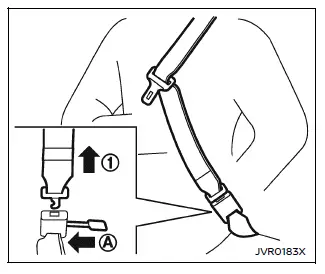
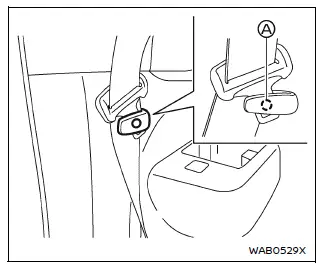
Do not allow children to play with seat belts inside the Nissan Armada. Many seating positions are equipped with an Automatic Locking Retractor (ALR). If a seat belt wraps around a child’s neck while ALR mode is active, it may tighten and cause serious injury or even death, even if the vehicle is stationary.
If this occurs, immediately unbuckle the seat belt. For the center seat in the 3rd row of the Nissan Armada, the connector tongue 1 can also be released by inserting a suitable object (such as a key) into the connector buckle A.
If the seat belt cannot be released, free the child immediately by cutting the belt with an appropriate tool such as scissors or a knife.
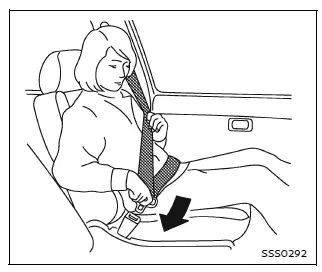
Fastening the seat belts
1. Adjust the seat position in the Nissan Armada for proper posture and comfort.
2. Slowly pull the seat belt from the retractor and insert the tongue into the buckle until you hear and feel it securely latch.
- The retractor in the Nissan Armada is designed to lock during sudden
stops or impacts.
Pulling the belt slowly allows normal movement and comfort while seated.
- If the seat belt does not extend from the fully retracted position, pull it firmly once and then release it.
Then smoothly pull the belt out again to use it normally.
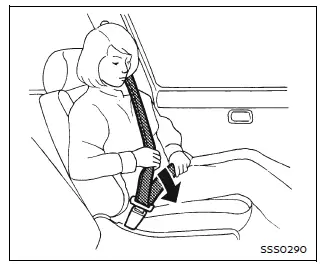
3. Position the lap belt low and snug across your hips, not your waist, as illustrated.
4. Pull the shoulder belt toward the retractor to remove slack. Ensure that the belt crosses your shoulder and chest correctly.
The three-point seat belts in the Nissan Armada operate using two distinct modes:
- Emergency Locking Retractor (ELR)
- Automatic Locking Retractor (ALR)
The Emergency Locking Retractor (ELR) mode allows the seat belt to extend and retract freely, providing comfort and mobility for occupants while driving.
In the event of rapid deceleration or collision, the ELR mechanism automatically locks the belt to restrain the occupant securely.
The Automatic Locking Retractor (ALR) mode is primarily intended for securing child restraint systems in the Nissan Armada.
When ALR mode is activated, the belt cannot extend further until it is fully retracted and reset. Once retracted completely, the system returns to ELR mode.
The ALR mode should only be used when installing a child restraint. During normal driving in the Nissan Armada, this mode should remain inactive, as it may create excessive belt tension and reduce comfort.
This advanced seat belt system in the Nissan Armada ensures both safety and comfort, making it an essential component of everyday driving protection.
WARNING
When fastening the seat belts in the Nissan Armada, always ensure that the seatbacks are fully returned to the upright position and securely latched. If the seatbacks are not properly locked, passengers in the Nissan Armada may be at increased risk of injury during sudden braking or in the event of a collision.
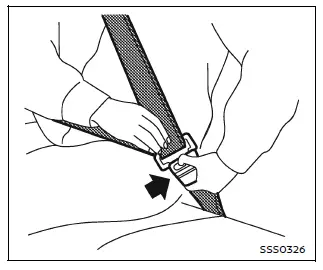
Unfastening the seat belts
To release the seat belt in the Nissan Armada, press the button on the buckle. Once released, the belt will automatically retract into its housing smoothly and safely.
Checking seat belt operation
The seat belt retractors in the Nissan Armada are engineered to lock under specific conditions, ensuring occupant protection when needed. They operate using two primary mechanisms:
- When the seat belt is pulled sharply or suddenly from the retractor.
- When the Nissan Armada decelerates rapidly or experiences an impact.
To verify proper seat belt function in the Nissan Armada, perform the following check:
- Grip the shoulder portion of the seat belt and pull it forward quickly. The retractor should immediately lock and prevent further extension.
If the retractor does not lock during this test, the system may not be functioning correctly. In such cases, it is strongly recommended to have the Nissan Armada inspected by an authorized NISSAN dealer.
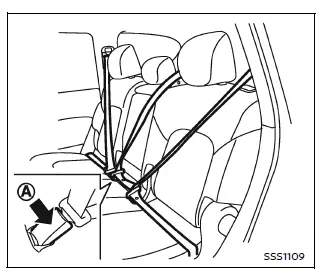
Example
Center of 2nd and 3rd row seats (if so equipped)
Selecting correct set of seat belts:
In the Nissan Armada, the center seat belt buckle is clearly marked with the word "CENTER". The corresponding seat belt tongue is specifically designed to latch only into this buckle, ensuring proper and secure fastening.
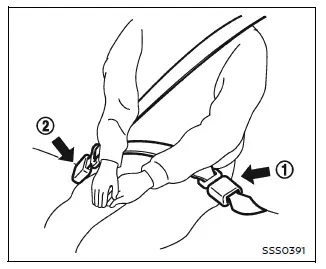
3rd row center seat belt
The 3rd row center seat belt in the Nissan Armada is equipped with two components: a connector tongue 1 and a seat belt tongue 2. Both must be properly engaged for the system to function correctly and provide full protection.
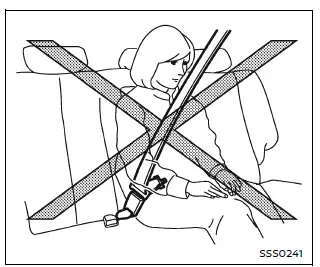
WARNING
- Always fasten the connector tongue and the seat belt tongue in the correct sequence as shown when using the seat belt in the Nissan Armada.
- Ensure that both the connector tongue and the seat belt tongue are securely latched when using the seat belt or installing a child restraint system. Using only one connection may result in serious injury in the event of an accident or sudden stop.
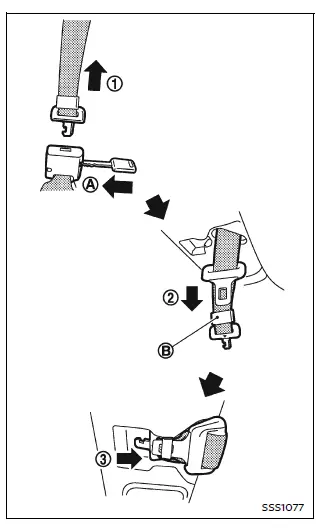
Stowing 3rd row center seat belt:
When folding the 3rd row seat in the Nissan Armada, the center seat belt can be safely stored to prevent interference or damage.
1. Hold the connector tongue 1 firmly to prevent sudden retraction. Release it from the connector buckle by inserting a suitable tool, such as a key A.
2. Place the seat belt tongue into the designated holder B first (2).
3. Then secure the connector tongue into the retractor base (3) for proper storage.
WARNING
Do not disconnect the 3rd row center seat belt connector in the Nissan Armada unless the seat is being folded down. Improper handling may compromise safety.
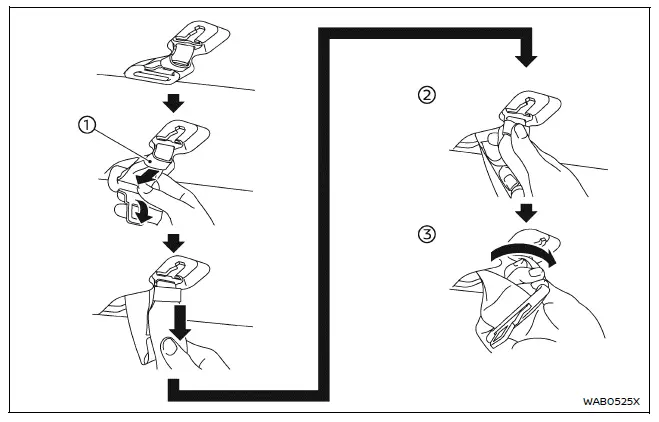
Proper handling and use of seat belts in the Nissan Armada ensure maximum safety for all occupants and help maintain the effectiveness of the vehicle’s restraint systems in all driving conditions.
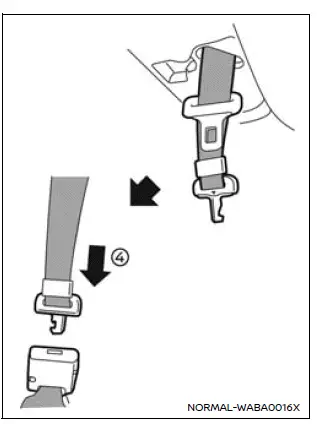
Attaching 3rd row center seat belt:
When using the Nissan Armada, always ensure that the 3rd row center seat belt connector tongue and connector buckle are properly connected before driving. These components should only be disconnected when folding the 3rd row seats to maintain safety and correct operation of the restraint system.
To connect the buckle correctly in the Nissan Armada:
1. Remove the seat belt tongue from the tongue holder 1, then pull it downward and firmly hold the seat belt.
2. Grip the belt near the connector tongue 2 and rotate it clockwise to release the connector tongue 3.
3. Pull both the connector tongue and the seat belt tongue downward to prepare for fastening.
4. Pull the belt and securely insert the connector tongue into the buckle until you hear a clear click 4, confirming proper engagement.
The center seat belt connector tongue and buckle in the Nissan Armada are marked with specific symbols to ensure correct matching:
 and
and
 mark.
mark.
The connector tongue is designed to fit only into the corresponding center buckle, ensuring proper alignment and safe operation in the Nissan Armada.
WARNING
- When attaching the 3rd row center seat belt in the Nissan Armada, always verify that the seatbacks are fully upright and securely latched, and that the connector is completely fastened.
- If either the seatbacks or the connector are not properly secured, there is a significantly increased risk of serious injury during an accident or sudden stop.
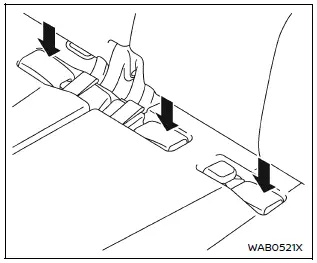
Storing 3rd row seat belt buckles
Before folding the seats in the Nissan Armada, place the seat belt buckles into the designated storage area within the seat cushion. This prevents them from falling beneath the seat or becoming damaged during seat movement.
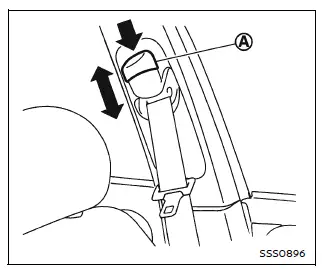
Shoulder belt height adjustment (for front seats)
The Nissan Armada allows you to adjust the height of the shoulder belt anchor to ensure optimal positioning and comfort. Proper adjustment improves both safety and usability.
To adjust the shoulder belt height, press the button A and slide the anchor up or down until the belt rests comfortably across the center of your shoulder. The belt should not touch your neck or face and should not slip off your shoulder.
Release the adjustment button to lock the anchor securely into the selected position.
WARNING
- After adjusting the shoulder belt height in the Nissan Armada, release the button and attempt to move the anchor to confirm it is securely locked.
- Incorrect shoulder belt positioning may reduce the effectiveness of the restraint system and increase the risk or severity of injury in an accident.
Seat belt hook
When the seat belts in the Nissan Armada are not in use, especially during folding of the 2nd row seats, secure the outer seat belts using the dedicated seat belt hooks.
The inner convex section of hook A is specifically designed to hold the seat belt tongue, preventing it from swinging freely or becoming damaged.
WARNING
Before folding the rear seats in the Nissan Armada, always ensure that the seat belts are properly positioned and not obstructing the seatback latching mechanism. Failure to do so may damage the seat belt webbing or interfere with proper seat locking.
This thoughtful seat belt management system in the Nissan Armada enhances both safety and durability, ensuring that all components remain in proper working condition during daily use.
 Precautions on seat belt usage
When seated properly in the Nissan Armada, with your seat belt correctly adjusted,
your back positioned firmly against the seat and both feet placed on the floor,
the risk of serious injury or fat ...
 Seat belt extenders
If, due to body size or seating position, the standard lap-shoulder belt in the
Nissan Armada cannot be comfortably or properly fastened, a compatible seat belt
extender is available. This accesso ...
Other materials:
Stop and Turn Signal Lamp Bulb Replacement (Sedan)
Stop and Turn Signal Lamp Bulb Replacement
Callout
Component Name
Preliminary Procedure
Remove the tail lamp assembly. Refer to Tail Lamp Replacement.
1
Tail Lamp Socket
Procedure
Rotate the ...
Front Seat Belt Anchor Plate Tensioner Replacement
Front Seat Belt Anchor Plate Tensioner Replacement
Callout
Component Name
Warning: Refer to SIR Warning.
Warning: In order to prevent accidental deployment and the
risk of personal injury, do not dispose of a ...
Cylinder Head Assemble
Special Tools
EN-958 Valve Stem Seal Installer
EN-8062 Valve Spring Compressor
EN-8062-5 Adapter
EN-50717-2 Compressor Assembly of EN-50717 Kit
For equivalent regional tools, refer to Special Tools.
Lubricate the valve stem and the valve guide with clean engine oil.
...

0.0052