
Nissan Armada 2025-2026 Owner's Manual: Towing safety
Trailer hitch
Your Nissan Armada is equipped with a factory-installed trailer towing package designed to support reliable and safe towing operations.
This package includes a robust, frame-mounted receiver-type hitch that is engineered to handle the maximum towing capacity of the Nissan Armada when the correct towing equipment is used.
Always select a ball mount and hitch ball that are properly rated for the specific trailer you intend to tow with your Nissan Armada.
For optimal compatibility and safety, Genuine NISSAN ball mounts and hitch balls are available through authorized Nissan dealerships.
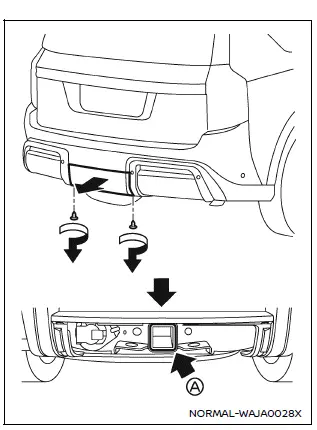
To access the trailer hitch on your Nissan Armada, remove the protective hitch cover located at the lower section of the rear bumper.
To remove the trailer hitch cover:
1. Rotate and remove the two retaining clips by turning them counterclockwise.
2. Carefully pull the lower portion of the cover straight backward to release the internal and upper clips.
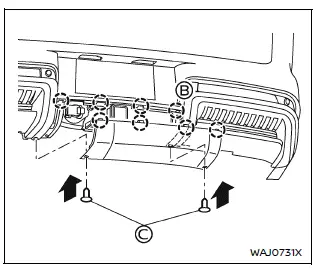
To reinstall the trailer hitch cover:
1. Align and insert the upper clips into the designated recesses B, then press the cover firmly into place.
2. Secure the cover by installing the two clips C, pressing them in as shown.
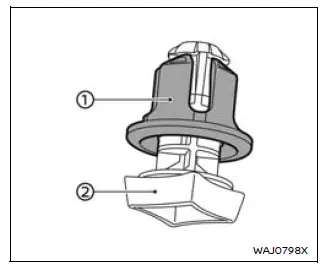
If installing clips C is difficult, first remove the grommet 1 from the pin 2.
Insert the grommet into both the bumper and the cover, then press the pin into the grommet to secure it properly.
WARNING
All trailer hitch components used with your Nissan Armada have specific load ratings. Even if your vehicle is capable of towing heavier loads, never exceed the rated capacity of the hitch components.
Failure to follow these limits may result in equipment failure, serious injury, or significant property damage.
Hitch ball
When selecting a hitch ball for your Nissan Armada, ensure it matches the size and weight requirements of your trailer:
- The required hitch ball size is typically stamped on the trailer coupler, and most hitch balls also display their size on top.
- Select the correct hitch ball class based on the total trailer weight.
- The threaded shank diameter of the hitch ball must match the ball mount opening. The shank should not be more than 1/16 inch smaller than the mounting hole.
- The threaded portion must be long enough to allow secure fastening, with at least two threads visible beyond the lock washer and nut.
Ball mount
The hitch ball is mounted onto the ball mount, which is then inserted into the hitch receiver of your Nissan Armada.
Choose a ball mount with the appropriate weight rating and drop/rise configuration to ensure the trailer remains level when connected.
Weight carrying hitches
A weight-carrying (or “dead weight�) hitch is designed to support the entire trailer tongue weight directly on the hitch and receiver of the Nissan Armada.
This type of hitch is suitable for lighter trailers within the standard towing limits.
Weight distribution hitch
A weight-distributing hitch, also known as a load-leveling or equalizing hitch, uses spring bars to distribute the trailer’s tongue weight more evenly across the Nissan Armada and trailer axles.
This system improves stability by transferring part of the load to the front wheels of the vehicle, enhancing steering control and braking performance.
For trailers exceeding 5,000 lbs (2,267 kg), a Class IV weight-distributing hitch system is strongly recommended when towing with your Nissan Armada.
Always consult trailer and equipment manufacturers to confirm compatibility and proper setup.
NOTE:
Be aware that weight-distributing hitch systems may affect the operation of trailers equipped with surge brakes.
Before using such a setup with your Nissan Armada, consult the trailer, brake, or hitch manufacturer to determine safe and proper compatibility.
Always carefully follow the manufacturer’s instructions when installing and operating a weight-distributing hitch system on your Nissan Armada to ensure proper performance and safety.
General setup guidelines for the Nissan Armada are outlined below:
1. Park the unloaded Nissan Armada on a flat, level surface. With the ignition switch in the ON position and all doors closed, allow the vehicle to remain stationary for several minutes so the suspension can stabilize and level properly.
2. Measure and record the height of a fixed reference point at the center of both the front and rear bumpers.
3. Connect the trailer to your Nissan Armada and adjust the hitch equalizer bars so that the front bumper height is within 0–0.5 inches (0–13 mm) of the original reference measurement taken in step 2. Ensure that the rear bumper height does not exceed the original reference height.
WARNING
Proper adjustment of the weight-distributing hitch on your Nissan Armada is critical. The rear bumper must never sit higher than its original reference height after the trailer is attached. Failure to maintain correct alignment may result in unstable handling, reduced control, and increased risk of serious injury or property damage.
Sway control device
External factors such as sudden steering inputs, crosswinds, and turbulence from passing vehicles can significantly affect trailer stability when towing with your Nissan Armada.
A sway control device can help reduce these effects and improve overall towing stability. If you plan to use one, consult a trusted trailer equipment supplier to ensure compatibility with your Nissan Armada, hitch system, trailer, and braking setup.
Always follow the manufacturer’s instructions when installing and using sway control equipment.
Class I hitch
Class I trailer hitch components (receiver, ball mount, and hitch ball) are suitable for towing trailers up to 2,000 lb (907 kg) with your Nissan Armada.
Class II hitch
Class II hitch equipment can handle trailer weights up to 3,500 lb (1,588 kg).
Class III hitch
Class III towing systems are rated for trailers up to 5,000 lb (2,267 kg).
Class IV hitch
Class IV hitch systems are designed for heavy-duty towing up to 10,000 lb (4,545 kg). When towing trailers exceeding 5,000 lb (2,267 kg) with your Nissan Armada, the use of a weight-distributing hitch system is strongly recommended for improved stability and load distribution.
Even if your Nissan Armada is equipped with a Class IV hitch rated for 10,000 lb, always follow the specific towing limits listed in the "Towing Load/Specification" chart for your vehicle configuration.
CAUTION
- Do not use axle-mounted hitches with your Nissan Armada, as they are not designed for safe towing with this vehicle.
- Avoid modifying critical systems such as the exhaust or braking system, as this may compromise safety and vehicle integrity.
- Do not install additional hitch systems, since the Nissan Armada is already equipped with a properly engineered frame-mounted hitch.
Tire pressures
- When towing with your Nissan Armada, always inflate the tires to the recommended cold tire pressure indicated on the Tire and Loading Information label.
- Ensure that the trailer tires meet the required specifications for size, load rating, condition, and inflation pressure as defined by the trailer manufacturer.
Safety chains
Always use properly rated safety chains when towing with your Nissan Armada.
The chains should be crossed underneath the trailer tongue and securely attached to the hitch—not to the bumper or axle.
Leave sufficient slack in the chains to allow for safe turning without restricting movement.
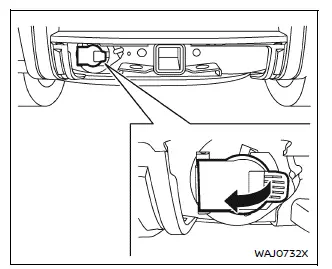
Trailer lights
Your Nissan Armada towing package includes a 7-pin trailer harness connector located beneath the trailer hitch cover on the rear bumper.
CAUTION
- When connecting trailer lighting to your Nissan Armada, always use a commercially available power-type module or converter. This device draws power directly from the vehicle battery while using signal inputs from the tail lights, brake lights, and turn signals.
- The module/converter must not draw more than 15 milliamps from the stop and tail lamp circuits. Exceeding this limit may damage the vehicle’s electrical system. Always consult a professional trailer equipment installer for proper setup.
- Do not connect electrical devices that draw more than 40 amps, as this may cause the fusible link to fail and result in electrical system damage.
Trailer lighting connected to your Nissan Armada must comply with all applicable federal, state, and local regulations.
If you are unsure about proper wiring or compatibility, it is highly recommended to consult an authorized NISSAN dealer or a qualified trailer equipment specialist to ensure safe and correct installation.
Trailer brakes
When towing a trailer with a loaded weight of 3,500 lbs (1,587 kg) or more using your Nissan Armada, the trailer MUST be equipped with its own independent braking system.
Additionally, many regions require trailers above certain weight thresholds to have dedicated braking systems by law. Always verify and comply with local regulations wherever you intend to tow with your Nissan Armada.
Several trailer brake system types are commonly used:
Surge Brakes – In this system, a hydraulic actuator is mounted on the trailer tongue and connected to each wheel via hydraulic lines.
Braking is automatically activated when the trailer pushes forward against the hitch during deceleration of the Nissan Armada.
This type of system is often found on rental trailers and boat trailers and does not require an electrical connection between the vehicle and trailer.
Electric Trailer Brakes – These systems operate via an electronic signal from a trailer brake controller installed in the Nissan Armada (if equipped).
They provide adjustable and responsive braking performance, making them suitable for heavier trailers.
For optimal safety, always have trailer braking systems installed and inspected by a qualified towing equipment specialist. Proper brake testing should also be performed before towing.
WARNING
Never connect a trailer braking system directly to the Nissan Armada vehicle braking system, as this can cause severe damage and unsafe braking conditions.
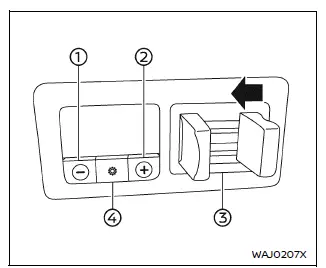
- Gain -
- Gain +
- Manual control lever
- Boost
Trailer Brake Controller Unit (TBCU) (if so equipped)
The Trailer Brake Controller Unit (TBCU) in your Nissan Armada is located on the instrument panel and is designed to provide smooth, controlled braking when towing a trailer.
This system enhances safety by synchronizing trailer braking with vehicle braking, improving overall stability.
Operating modes:
- Automatic mode: This is the default operating mode of the Nissan Armada TBCU. It applies trailer braking force automatically based on the brake pedal input and the selected gain and boost settings.
- Manual mode: This mode is activated by using the manual control lever. It allows the driver to apply braking force to the trailer independently of the Nissan Armada brake pedal, which can be useful in controlling trailer sway.
To adjust and monitor system output:
- Gain + and Gain - : These controls allow you to increase or decrease braking force sent to the trailer brakes. The adjustment range is typically from 0 to 10. For example, a gain setting of 6.0 is often suitable for towing heavier loads with your Nissan Armada.
- Boost: This feature adjusts the intensity of trailer braking when the vehicle brake pedal is applied. Press the Boost button to cycle through levels (OFF, 1, 2, or 3) depending on trailer size and load conditions.
- Manual Control Lever: This lever allows manual application of trailer brakes without engaging the Nissan Armada braking system. The braking force depends on how much pressure is applied to the lever.
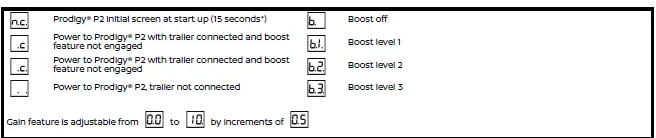
*If the condition persists for an extended period, inspect trailer connections or consult a NISSAN dealer for professional service.
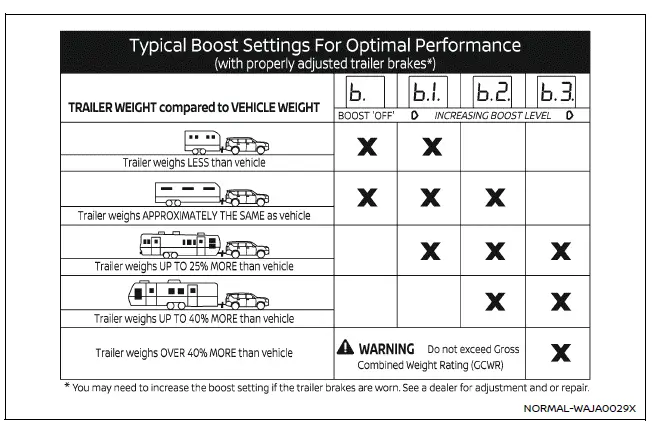
This illustration provides recommended boost level settings for various trailer sizes relative to the Nissan Armada.
WARNING
Never exceed the Gross Combined Weight Rating (GCWR) of your Nissan Armada, as doing so can result in unsafe driving conditions and potential mechanical failure.
Electric trailer brake controller (if so equipped)
The electric trailer brake controller in your Nissan Armada offers precise control over trailer braking performance and should be adjusted according to load conditions and driving environment for maximum safety.
Trailers equipped with electric braking systems may require the installation of an aftermarket trailer brake controller to function properly with your Nissan Armada.
The Nissan Armada is pre-equipped with a dedicated connector specifically designed to simplify the installation of an aftermarket trailer brake controller, ensuring compatibility and reliable operation.
To install an aftermarket trailer brake controller on your Nissan Armada, follow these detailed steps:
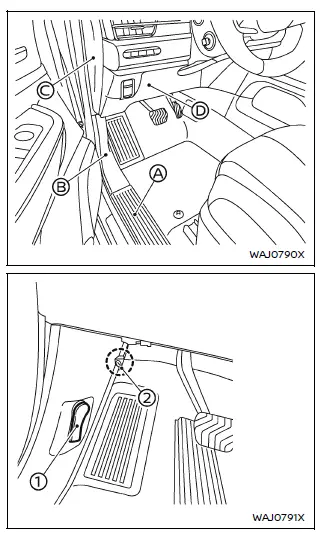
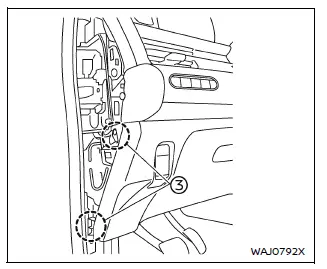
- Open the driver’s door of your Nissan Armada and move the seat fully rearward to create sufficient working space.
- Carefully remove the kicking plate A.
- Remove the dash side trim B.
- To avoid damaging the trim, wrap the screwdriver tip and clip removal tool with protective tape.
- Remove the hood release handle 1 using a flat-head screwdriver and clip remover.
- Detach the dash side trim clip 2 using an appropriate clip removal tool.
- Remove the dash side trim panel B completely.
- Remove the instrument panel side finisher (driver’s side) C.
- Remove the lower section of the instrument panel (driver’s side) D.
- Unscrew the fasteners 3 using a screwdriver.
- Detach and remove the lower instrument panel section D.
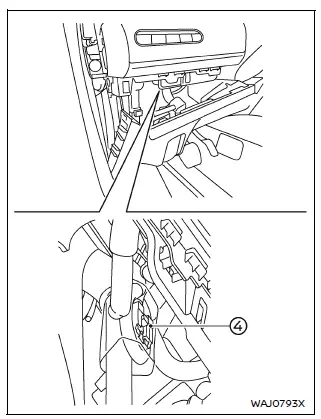
- Locate the jumper harness connector 4 within the lower instrument panel
area. This connector is typically taped to the main wiring harness.
If locating the connector proves difficult, it is recommended to seek assistance from an authorized NISSAN dealer.
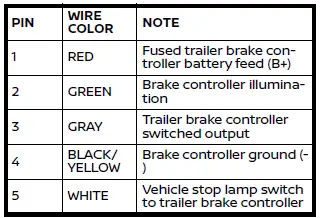
Refer to the wiring color designation for proper identification when connecting the electric trailer brake controller.
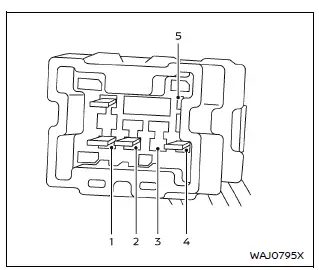
Jumper harness connector
- Remove the protective tape and connect the aftermarket jumper harness securely to the factory connector.
- Release the parking brake.
- Install the aftermarket electric trailer brake controller according to the manufacturer’s instructions, ensuring proper mounting and wiring for your Nissan Armada.
Pre-towing tips
- Ensure your Nissan Armada remains level when a trailer is attached, whether loaded or unloaded. If the vehicle appears nose-up or nose-down, inspect for incorrect tongue weight, overloading, or suspension issues.
- Always secure cargo inside the trailer to prevent shifting during transport.
- Keep the trailer load as low as possible to maintain a low center of gravity and improve stability.
- Distribute trailer weight properly: approximately 60% toward the front and 40% toward the rear, while maintaining side-to-side balance.
- Before each trip with your Nissan Armada, inspect the hitch connection, tire pressures (vehicle and trailer), trailer lighting, and wheel lug nut tightness.
- Ensure your mirrors meet all local regulations. If necessary, install extended towing mirrors before driving.
- Determine the total height of your Nissan Armada and trailer combination to avoid clearance issues.
Trailer towing tips
To become comfortable with towing using your Nissan Armada, practice maneuvering in a safe, traffic-free area. Turning radius, braking distance, and vehicle response will differ significantly compared to normal driving conditions.
- Always secure cargo in the trailer to prevent shifting while driving.
- Lock the trailer coupler using a pin or locking device to prevent accidental disengagement.
- Avoid sudden acceleration, braking, or abrupt maneuvers with your Nissan Armada.
- Drive at moderate speeds and adhere to all towing-related speed limits applicable in your area.
- When reversing, hold the bottom of the steering wheel with one hand to better control trailer direction.
When reversing your Nissan Armada with a trailer, move your hand in the direction you want the trailer to travel. Use small, controlled steering inputs and back up slowly to maintain accuracy and stability. Whenever possible, have another person guide you to ensure safe maneuvering and avoid obstacles.
Always secure both the Nissan Armada and the trailer by blocking the wheels when parking. Parking on an incline is not recommended; however, if unavoidable, follow these safety procedures carefully:
CAUTION
Do not shift the transmission of your Nissan Armada into P (Park) before properly blocking the wheels and applying the parking brake, as this may result in transmission damage.
1. Firmly apply and hold the brake pedal.
2. Have an assistant place wheel blocks on the downhill side of both the Nissan Armada and trailer wheels.
3. Slowly release the brake pedal until the vehicle weight is fully supported by the wheel blocks.
4. Engage the parking brake.
5. Shift the transmission into P (Park).
6. Turn off the engine.
To resume driving with your Nissan Armada:
1. Press and hold the brake pedal.
2. Start the engine.
3. Shift the transmission into the appropriate driving gear.
4. Release the parking brake.
5. Move forward slowly until the vehicle and trailer are clear of the wheel blocks.
6. Apply and hold the brake pedal again.
7. Have an assistant remove and store the wheel blocks safely.
- When descending hills with your Nissan Armada, the trailer’s weight can
push forward and reduce overall stability. To maintain control, reduce speed
and shift into a lower gear.
Avoid prolonged or repeated braking, as this can lead to brake overheating and reduced effectiveness. Instead, use engine braking by selecting a lower gear to assist in controlling speed.
- If the engine coolant temperature increases significantly, refer to the section "If your vehicle overheats" for proper procedures.
- Towing a trailer with your Nissan Armada increases fuel consumption compared to normal driving conditions.
- Avoid towing during the first 500 miles (800 km) to allow proper break-in of engine and drivetrain components.
- Schedule maintenance for your Nissan Armada more frequently than the standard intervals listed in the maintenance schedule when regularly towing.
- During turns, the trailer wheels track closer to the inside than the Nissan Armada’s wheels. To compensate, take wider turns to avoid curbs or obstacles.
- Crosswinds and uneven road surfaces can negatively affect trailer stability. When being overtaken by large vehicles, be prepared for sudden airflow changes that may influence handling.
If trailer sway occurs while towing with your Nissan Armada, follow these steps:
1. Gradually release the accelerator pedal and allow the vehicle to coast while keeping the steering wheel as straight as possible. This helps stabilize the trailer.
- Do not attempt to correct sway by steering abruptly or applying the brakes.
2. Once the trailer stabilizes, gently apply the brakes and pull over to a safe location.
3. Rebalance the trailer load to ensure proper weight distribution, as outlined earlier in this section.
- Exercise extra caution when overtaking other vehicles.
Passing while towing with your Nissan Armada requires significantly more distance. Ensure that both the vehicle and the entire length of the trailer have safely cleared the other vehicle before returning to your lane.
- Use TOW mode (if equipped) or manually downshift to a lower gear when descending steep or extended grades. This provides engine braking and reduces reliance on the braking system.
- Avoid continuous or excessive brake pedal use, as this may cause brake overheating and reduced stopping efficiency.
- Lane Departure Warning (LDW) system
- Intelligent Lane Intervention (I-LI) system
- Intelligent Blind Spot Intervention (IBSI) system
- Rear Cross Traffic Alert (RCTA) system
- ProPILOT Assist systems (including Intelligent Cruise Control (ICC), ProPILOT Assist, and Steering Assist)
- Automatic Emergency Braking (AEB) with Pedestrian Detection
- Intelligent Forward Collision Warning (I-FCW)
- Rear Automatic Braking (RAB)
When towing a trailer, the transmission fluid should be changed more frequently.
TOW mode (if so equipped)
Using TOW mode in your Nissan Armada is highly recommended when towing heavy trailers or transporting significant loads.
Refer to the "Drive Mode Selector (if so equipped)" section to activate TOW mode. Note that TOW mode will automatically deactivate when the ignition is switched OFF.
TOW mode enhances towing performance through the following features:
- Grade logic – Optimizes transmission shift patterns when ascending inclines with a trailer or heavy cargo.
- Downhill Speed Control (DSC) – Automatically downshifts the transmission when descending slopes to help regulate speed and reduce brake usage.
Operating your Nissan Armada in TOW mode without a trailer or with a light load will not cause damage. However, it may result in reduced fuel efficiency and altered driving characteristics.
When towing regularly, it is essential to service your Nissan Armada more frequently, including more frequent transmission fluid changes.
Trailer Sway Control
The Nissan Armada is equipped with Trailer Sway Control, which helps reduce trailer instability by selectively applying braking force to individual wheels based on sensor input and vehicle speed.
This system operates as part of the Vehicle Dynamic Control (VDC) system and is active only when VDC is enabled.
CAUTION
If the VDC OFF switch is activated (VDC disabled), Trailer Sway Control will also be disabled, reducing stability assistance while towing with your Nissan Armada.
When Trailer Sway Control is engaged, the VDC warning light will flash. Once stability is restored, the indicator will turn off.
If Trailer Sway Control activates:
1. Release the accelerator pedal and allow your Nissan Armada to coast while maintaining a straight steering direction, as road conditions permit. This helps stabilize the trailer.
CAUTION
Do not attempt to correct trailer sway by steering aggressively or applying the brakes, as this may worsen the instability.
2. Once the trailer stabilizes, gently apply the brakes and pull over safely.
3. Adjust and redistribute the trailer load to ensure proper weight balance before continuing your journey.
NOTE:
Trailer Sway Control in the Nissan Armada may not be able to eliminate sway in all conditions, especially in extreme weather or improper loading situations.
 Maximum Gross Vehicle Weight (GVW)/maximum Gross Axle Weight (GAW)
The total Gross Vehicle Weight (GVW) of your Nissan Armada must never exceed
the Gross Vehicle Weight Rating (GVWR) indicated on the F.M.V.S.S./C.M.V.S.S. certification
label.
GVW represents ...
 Flat towing your vehicle
Flat towing
Flat towing—also referred to as dinghy towing or “4-down� towing—means towing
your Nissan Armada with all four wheels in contact with the ground.
This method is commonly used w ...
Other materials:
Front Side Door Adjustment
Front Side Door Adjustment
Callout
Component Name
Preliminary Procedure
Remove the front wheelhouse liner. Refer to Front Wheelhouse Liner Replacement.
1
Front Side Door
Caution: Refer to ...
Aluminum Wheel Refinishing
Finish Damage Evaluation Procedure
Note:
If the wheels are chrome-plated, do not re-plate or refinish
the wheels.
If the wheels are polished aluminum, do not refinish the wheels
in the dealer environment. Utilize a refinisher that meets manufacturer
...
Manual Transmission Shift Lever Cable Adjustment
Special Tools
DT-527-A Adjuster or 5mm drill bit
For equivalent regional tools, refer to Special Tools.
Note: Not using the specified tools may lead to shift system mis-adjustment.
Remove the floor console. Refer to
Front Floor Console Replacement.
Lift upward an ...

0.0067