
Nissan Armada 2025-2026 Owner's Manual: Ventilated seats
Basic information
CAUTION
- In the Nissan Armada, avoid using the ventilated seat system for long periods when the seat is unoccupied to prevent unnecessary wear and energy consumption.
- Do not place heavy, sharp, or pointed objects on the Nissan Armada seats, as this may damage the internal ventilation components.
- If any liquid is spilled on the seat, immediately wipe it off using a clean, dry cloth to prevent system damage.
- Never clean the Nissan Armada seats with gasoline, thinner, or similar harsh chemicals, as these may degrade materials and internal components.
- If the ventilated seat system in the Nissan Armada does not operate correctly, switch it off and have it inspected by an authorized Nissan dealer.
The Nissan Armada ventilated seat system enhances comfort by circulating air through the seat surface, helping to cool occupants during warm weather conditions.
Control keys are available via the touch screen display, while physical switches are located on the instrument panel. Each seat in the Nissan Armada can be controlled independently for personalized comfort.
Operation with touch screen display
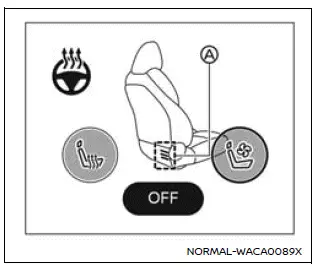
Example
1. Start the Nissan Armada engine.
2. Touch the
 or
or
 key to select the desired ventilation level.
Each press cycles through intensity levels (low, medium, high), and the indicator A illuminates in blue according to the selected setting.
3. To turn off the ventilated seats in the Nissan Armada, press the
 key repeatedly until the indicator A turns off.
Before leaving the Nissan Armada, always ensure the ventilated seat system is turned off.
For proper maintenance, including inspection of air filters for the Nissan Armada ventilated seats, it is recommended to visit an authorized Nissan dealer.
Operation with switch
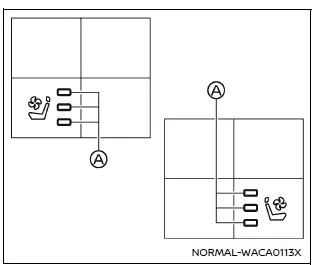
For front seats
1. Start the Nissan Armada engine.
2. Press the
 or
or
 switch to adjust ventilation intensity.
Each press increases the level, and the indicator A will glow blue depending on the selected airflow intensity.
3. To turn off the system, press the
 switch repeatedly until the indicator turns off.
Always turn off the ventilated seats before exiting the Nissan Armada to preserve system longevity.
Routine inspection of the Nissan Armada ventilated seat filters should be performed by a qualified Nissan technician.
 Heated seats
Basic information
WARNING
In the Nissan Armada, avoid using seat heaters if occupants are unable to
sense temperature changes or pain. Improper use may result in overheating and serious
injury.
...
 Steering Assist switch
The Steering Assist switch in the Nissan Armada allows the driver to temporarily
enable or disable the Steering Assist function.
Additionally, the system can be controlled through the "Dri ...
Other materials:
Relay Replacement (Within an Electrical Center)
Special Tools
EL-43244 Relay Puller Pliers
Removal Procedure
Remove the electrical center cover.
Note:
Always note the orientation of the relay.
If equipped with a notch style relay; observe the location of
the notch on the old relay to verify the new r ...
Engine Coolant Thermostat Housing Replacement (LUW)
Removal Procedure
Remove the battery tray. Refer to Battery Tray Replacement.
Raise and support the vehicle. Refer to Lifting and Jacking the Vehicle.
Drain the cooling system. Refer to Cooling System Draining and Filling.
Disconnect the engine harness conn ...
Basic information
The Nissan Armada is equipped with an advanced automatic brake hold function
designed to enhance driving convenience in stop-and-go traffic conditions. This
system automatically maintains braking force when the vehicle comes to a complete
stop, such as at traffic lights or intersections, allow ...

0.0062