
Chevrolet Sonic Repair Manual: Generator Removal
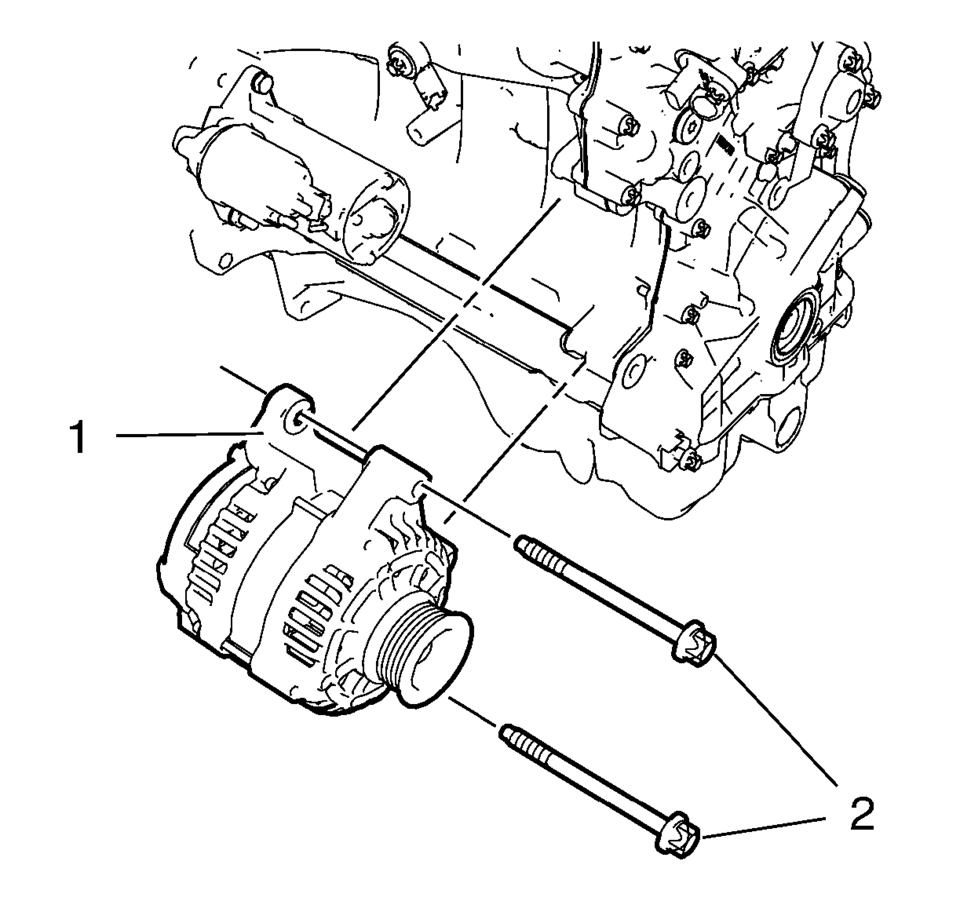
- Remove the 2 generator bolts (2).
- Remove the generator (1).
 Generator Installation
Install the generator (1).
Caution: Refer to Fastener Caution.
Install the 2 generator bolts (2) and tighten to 35 Y (26 lb ft).
...
 Generator Replacement (LUV)
Removal Procedure
Disconnect the negative battery cable. Refer to Battery Negative Cable
Disconnection and Connection.
Raise and support the vehicle. Refer to Lifting and Jacking ...
Other materials:
Climate Control Systems
These climate control systems control the heating, cooling, and ventilation for
the vehicle.
Climate Control System with Heater and Air Conditioning
1. Temperature Control
2. Fan Control
3. Air Delivery Mode Control
4. Driver and Passenger Heated Seats (If Equipped)
5. Air Conditioning
6. ...
Rear Wheelhouse Panel Liner Extension Replacement
Rear Wheelhouse Panel Liner Extension Replacement
Callout
Component Name
Preliminary Procedure
Remove the tire and wheel assembly. Refer to Tire and Wheel Removal and
Installation.
1
Rear Wheelh ...
Wireless charger
Lid
Charging pad
The Nissan Armada wireless charger is conveniently located beneath a lid in the
center console. Press the lid to open it, then place your smartphone on the charging
pad with the screen facing upward.
Once positioned correctly, the Nissan Armada wireless charging sys ...

0.0055