
Chevrolet Sonic Repair Manual: Backup Lamp Bulb Replacement (Sedan)
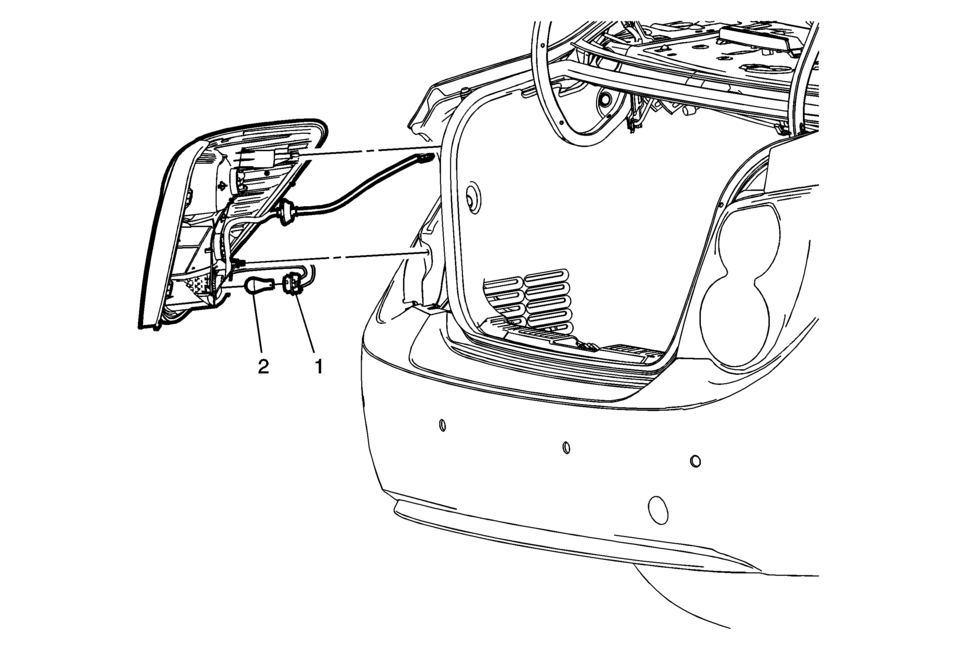
|
Callout |
Component Name |
|---|---|
|
Preliminary Procedure
Remove the tail lamp assembly. Refer to Tail Lamp Replacement. |
|
|
1 |
Back Up Lamp Bulb Socket Procedure
Rotate the back up lamp bulb socket counter-clockwise and remove from the tail lamp housing. |
|
2 |
Back Up Lamp Bulb Procedure
Push inward while rotating counter-clockwise on the bulb and remove from the lamp socket. |
 Exterior Lighting Systems Description and Operation
Exterior Lamps
The exterior lighting system consist of the following lamps if equipped:
Backup lamps
Front fog lamps
Hazard warning lamps
Headlamps
Park, tail and license la ...
 Backup Lamp Switch Replacement
Backup Lamp Switch Replacement
Callout
Component Name
Preliminary Procedure
Disconnect the negative battery cable. Refer to Battery ...
Other materials:
Valve Stem Oil Seal and Valve Spring Replacement
Special Tools
207649 Rod Hairpin Clips
547324 Flange Screws
EN-840 Pliers / Remover
EN-958 Installer
EN-45059 Angle Meter
EN-50717 Kit
J-43649?E Rods
For equivalent regional tools, refer to Special Tools.
Removal Procedure
Remove the spark plugs. Refer to Spark ...
Fluid Pump Selective Measurement
Fluid Pump Selective Measurement
Callout
Component Name
1
A/Trans Fluid Pump Body
Note: Measure the distance from the bottom of a gauge bar
to the bottom of the pump rotor cavity. Refer to
Fluid Pump Sel ...
Clock and outside air temperature
In the Nissan Armada, both the clock 1 and the outside air temperature 2 are
conveniently displayed at the top section of the vehicle information display, allowing
the driver to quickly access essential information while driving.
Clock
The clock in the Nissan Armada can be adjusted through ...

0.006