
Nissan Armada 2025-2026 Owner's Manual: Basic information
CAUTION
- Always use the Nissan Armada power outlets with the engine running to prevent battery discharge.
- Avoid using the power outlets simultaneously with high electrical loads such as air conditioning, headlights, or defrosters.
- Ensure all connected devices are turned OFF before plugging in or disconnecting them from the Nissan Armada outlets.
- Keep the outlet covers closed when not in use to prevent moisture or debris from entering.
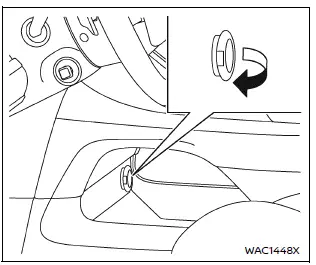
Power outlet (type A)
The Nissan Armada power outlet is conveniently positioned for easy access. Open the protective lid to use the outlet.
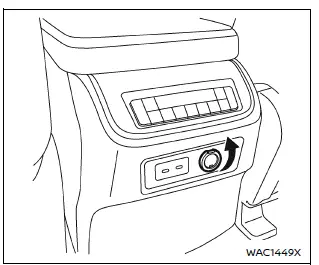
Power outlet (type A)
Type A:
The Nissan Armada Type A power outlet is suitable for powering small electronic devices such as mobile phones and portable accessories.
CAUTION
- The Nissan Armada outlet and plug may become warm during or immediately after use.
- Do not exceed a total load of 12V, 120W (10A) across all outlets in the Nissan Armada.
- Avoid using multiple adapters or connecting several devices simultaneously.
- Ensure the plug is fully inserted to maintain proper contact and prevent
overheating or fuse failure.
If not properly connected, overheating may occur.
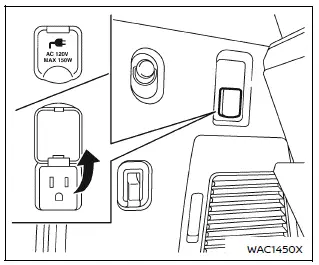
Power outlet (type B)
Type B (if so equipped):
The Nissan Armada Type B power outlet is located in the cargo area and operates when the ignition is in the ON position.
This outlet supports up to 120 volts and 150W (1.25A), making it suitable for higher-powered devices.
Lift the cover and connect your device securely.
After use, always switch off the Nissan Armada power outlet to conserve energy.
CAUTION
- Do not exceed the 120V, 150W (1.25A) rating when using the Nissan Armada Type B outlet.
- Always operate this outlet with the Nissan Armada engine running to avoid battery depletion.
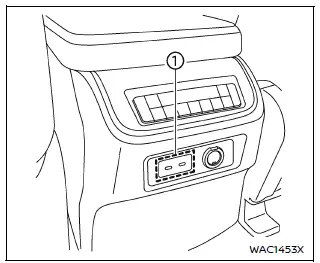
Back side of front console (9 volt, 27W, 3A)
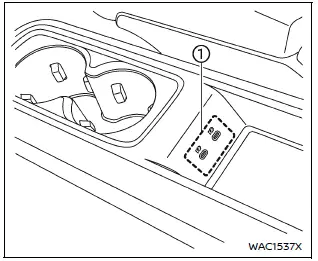
2nd row console (5 volt, 15W, 3A) (if so equipped)
The Nissan Armada also includes multiple USB charging ports throughout the cabin, ensuring convenient charging access for all passengers during travel.
 Power outlet
...
 USB (Universal Serial Bus) charging connector
In the Nissan Armada, the Type-C USB charging connector 1 is предназначен exclusively
for charging external devices such as smartphones, tablets, and other portable electronics.
To ...
Other materials:
Engine Oil
To ensure proper engine performance and long life, careful attention must be
paid to engine oil. Following these simple, but important steps will help protect
your investment:
Always use engine oil approved to the proper specification and of the proper
viscosity grade. See “Selecting th ...
Special Tools
Illustration
Tool Number / Description
CH?E9376
Holding Wrench
CH?E9400
J-45859
Hub Spindle Remover
DT-6332
Seal Protector
DT- ...
Automatic operation
The electronic parking brake in the Nissan Armada will automatically release
when the vehicle begins to move, provided the following conditions are met:
The engine is running.
The transmission is in D (Drive) or R (Reverse).
The driver’s door is closed.
In some situations, the parking ...

0.0054