
Chevrolet Sonic Repair Manual: Drum Brake Adjusting Hardware Inspection
- Visually inspect the adjuster actuator spring (1) for the following conditions:
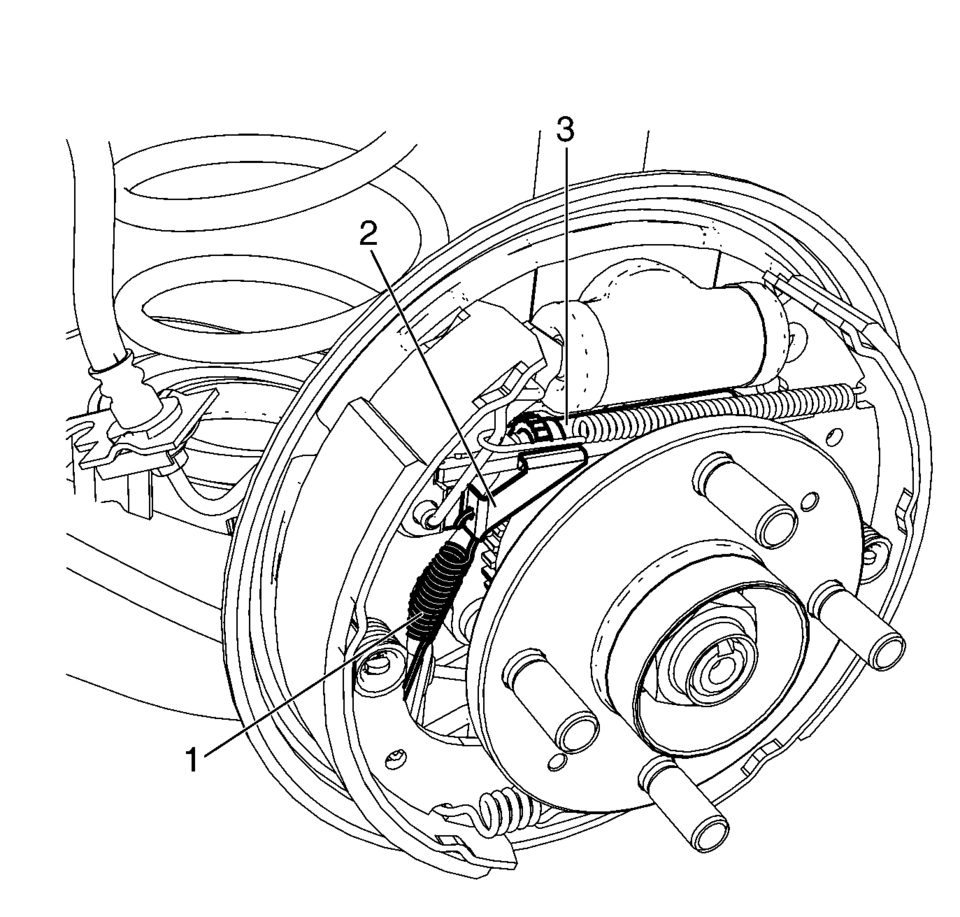
Warning:
Refer to Brake Dust Warning.
- Excessive stretching
- Excessive bending
- Excessive corrosion
- Broken
- Missing
- Bent
- Broken
- The lever engagement surface excessively worn
- Excessively bent or broken spring attachment tab
- Missing
- Bent
- Broken
- Seized adjuster wheel threads
- Excessively worn, damaged, or missing teeth
 Brake Drum Surface and Wear Inspection
Special Tools
CH-8001 Dial Indicator Set
For equivalent regional tools, refer to Special Tools.
Warning: Refer to Brake Dust Warning.
With the brake drum removed, clean the brake sh ...
 Drum Brake Adjusting Hardware Replacement (J93, J94)
Removal Procedure
Warning: Refer to Brake Dust Warning.
Raise and support the vehicle. Refer to Lifting and Jacking the Vehicle.
Remove the tire and wheel assembly. Re ...
Other materials:
Vehicle Data
Capacities and Specifications
The following approximate capacities are given in metric and English conversions.
See Recommended Fluids and Lubricants for more information.
Engine Specifications
Engine Drive Belt Routing
1.4L L4 Engine
1.8L L4 Engine (with Air Conditioning)
1. ...
Cooling System Draining and Filling
Draining Procedure
Warning: To avoid being burned, do not remove the radiator
cap or surge tank cap while the engine is hot. The cooling system will
release scalding fluid and steam under pressure if radiator cap or surge
tank cap is removed while the engine and radi ...
Engine Coolant Fan Resistor Mount Repair
Engine Coolant Fan Resistor Mount Repair
Callout
Component Name
Preliminary Procedure
Remove the fasteners securing the radiator surge tank to the engine
shroud and position the surge tank out of the way. Refer to Radiator
...

0.0074