
Chevrolet Sonic Repair Manual: Front Brake Caliper Replacement
- Removal Procedure
-
Warning:
Refer to Brake Dust Warning.
Warning:
Refer to Brake Fluid Irritant Warning.
- Raise and support the vehicle. Refer to Lifting and Jacking the Vehicle.
- Remove the tire and wheel assembly. Refer to Tire and Wheel Removal and Installation.
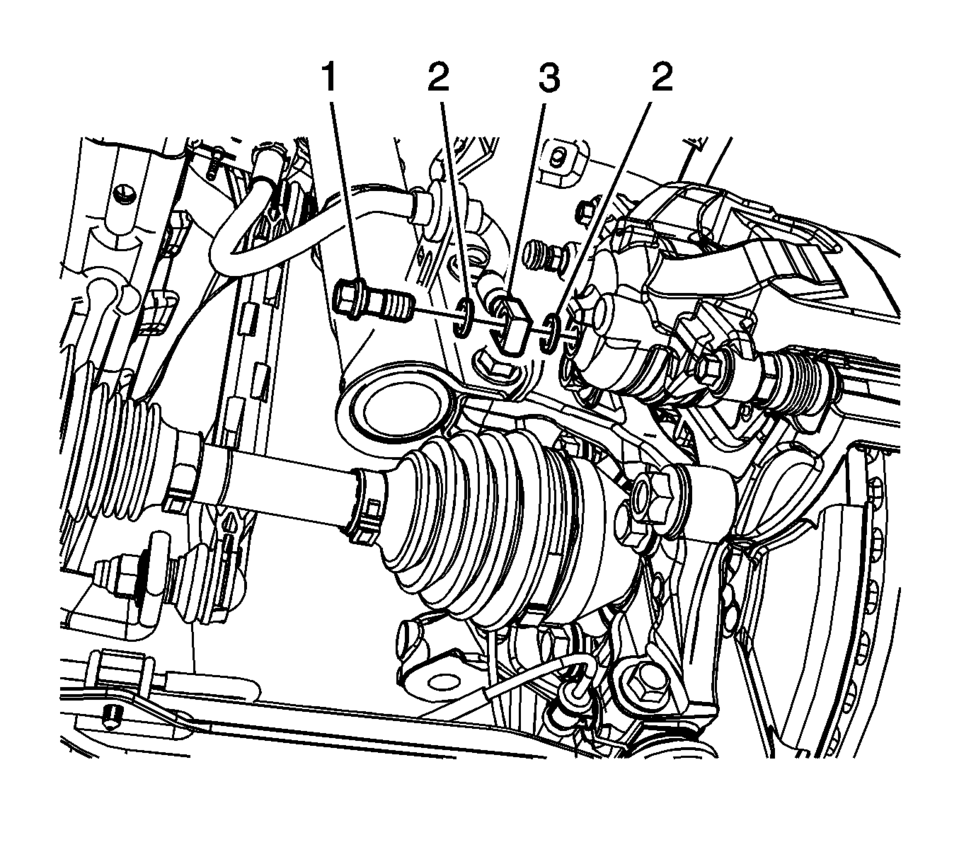
- Remove the brake hose fitting bolt (1).
- Remove and discard the brake hose fitting gaskets (2) from the brake hose fitting (3).
- Cap the brake hose fitting to prevent brake fluid loss and contamination.
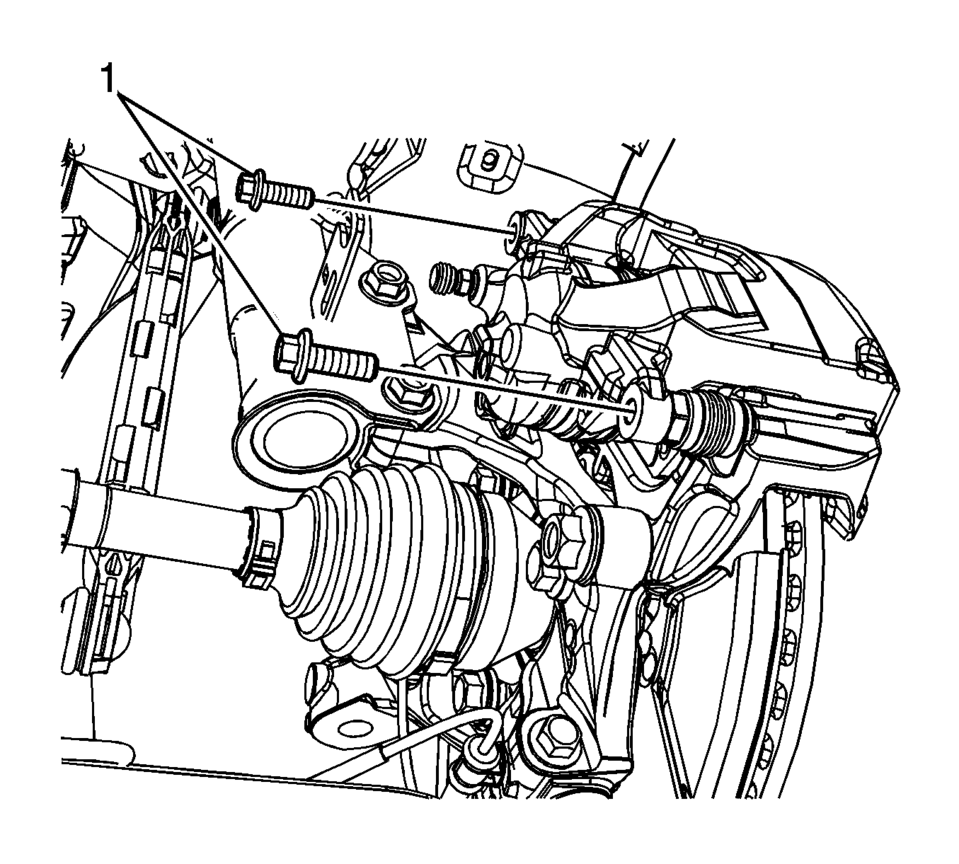
- DO NOT use any air tools to remove or install the guide pin bolts. Use hand tools ONLY.
- Install an open end wrench to hold the caliper guide pin in line with the brake caliper while removing or installing the caliper guide pin bolt. DO NOT allow the open end wrench to come in contact with the brake caliper. Allowing the open end wrench to come in contact with the brake caliper will cause a pulsation when the brakes are applied.
- Using a backup wrench to hold the brake caliper guide pin stationary, remove the brake caliper guide pin bolts (1).
- Remove the brake caliper.
Note:
Do not reuse the brake hose fitting gaskets.
Note:
- Installation Procedure
-
- Position the brake caliper over the brake pads and to the caliper bracket.
- Using a backup wrench to hold the brake caliper guide pin stationary,
install the brake caliper guide pin bolts (1) and tighten to 28 Y (21 lb ft)
.
- Assemble the brake hose fitting bolt (1) and the 2 new brake hose fitting gaskets (2) to the brake hose fitting (3).
- Install the brake hose assembly and tighten the brake hose fitting bolt
to 40 Y (30 lb ft)
.
- Bleed the hydraulic brake system. Refer to Hydraulic Brake System Bleeding.
- Install the tire and wheel assembly. Refer to Tire and Wheel Removal and Installation.
Caution:
Refer to Fastener Caution.
Note:
Install new brake hose fitting gaskets.
 Front Brake Caliper Overhaul
Disassembly Procedure
Warning: Refer to Brake Dust Warning.
Warning: Refer to Brake Fluid Irritant Warning.
Warning: Do not place fingers in front of the caliper ...
 Front Seat Belt Anchor Plate Tensioner Cover Replacement (4 Way)
Front Seat Belt Anchor Plate Tensioner Cover Replacement
Callout
Component Name
1
Driver or Passenger Seat Belt Tensione ...
Other materials:
Brake Pipe Replacement
Special Tools
CH-45405 Brake Pipe Flaring Kit
For equivalent regional tools, refer to Special Tools.
Warning: Refer to Brake Fluid Irritant Warning.
Warning: Always use double walled steel brake pipe when replacing
brake pipes. The use of any other pipe is not recomm ...
Air Conditioning Compressor Oil Balancing
Draining Procedure
Note: Drain and measure as much of the refrigerant oil as
possible from the removed compressor.
Drain the oil from both the suction and discharge ports of the removed
compressor into a clean, graduated container. Rotate the compressor sha ...
Transmission Mount Replacement - Left Side
Removal Procedure
Remove the battery tray. Refer to
Battery Tray Replacement.
Install the engine support fixture. Refer to
Engine Support Fixture.
Remove and DISCARD the left transmission mount to
bracket bolts (1).
Remove the left transmission mo ...

0.0057