
Chevrolet Sonic Repair Manual: Front End Upper Tie Bar Replacement
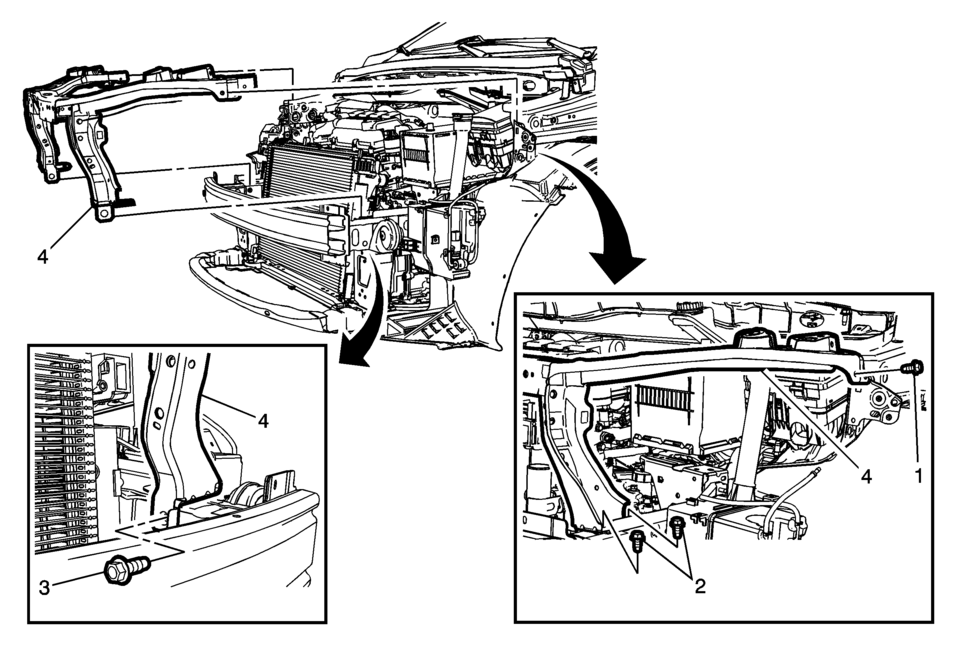
|
Callout |
Component Name |
|---|---|
Preliminary Procedures
|
|
|
1 |
Front End Upper Tie Bar Bolt (Qty:?€‰2) Caution: Refer to Fastener Caution.
9?€‰Y (80?€‰lb?€‰in) |
|
2 |
Front End Upper Tie Bar Lower Bolt (Qty:?€‰4) Tighten
22?€‰Y (16?€‰lb?€‰ft) |
|
3 |
Front Bumper Impact Bar Bolt (Qty:?€‰2) Tighten
100?€‰Y (74?€‰lb?€‰ft) |
|
4 |
Front End Upper Tie Bar Procedure
|
 Body Panel Paint Protector Replacement (VGC)
The paint protective film and vehicle surface temperature should be 13?€“32?°C
(55?€“90?°F) for best results.
Automatic car washes should be avoided for at least 24?€‰hours afte ...
 Front Opening Upper Cover Replacement
Front Opening Upper Cover Replacement
Callout
Component Name
1
Radiator Opening Upper Cover Screw (Qty:?€‰10)
...
Other materials:
Brake Fluid
The brake/clutch master cylinder reservoir is filled with DOT 3 brake fluid as
indicated on the reservoir cap. See Engine Compartment Overview for
the location of the reservoir.
There are only two reasons why the fluid level in the reservoir might go down:
The fluid level goes down ...
Steering Linkage Inner Tie Rod Replacement
Steering Linkage Inner Tie Rod Replacement
Callout
Component Name
Preliminary Procedures
Raise and support the vehicle. Refer to Lifting and Jacking the
Vehicle.
Remove the steering gear boot. Refer to Steering Gear Boot ...
Camshaft Cover Replacement
Camshaft Cover Replacement
Callout
Component Name
Preliminary Procedures
Remove the ignition coil. Refer to Ignition Coil Replacement.
Remove the PCV hose. Refer to Positive Crankcase Ventilation Hose/Pipe/Tube
Replac ...

0.0063