
Chevrolet Sonic Repair Manual: Front Wheel Drive Intermediate Shaft Replacement
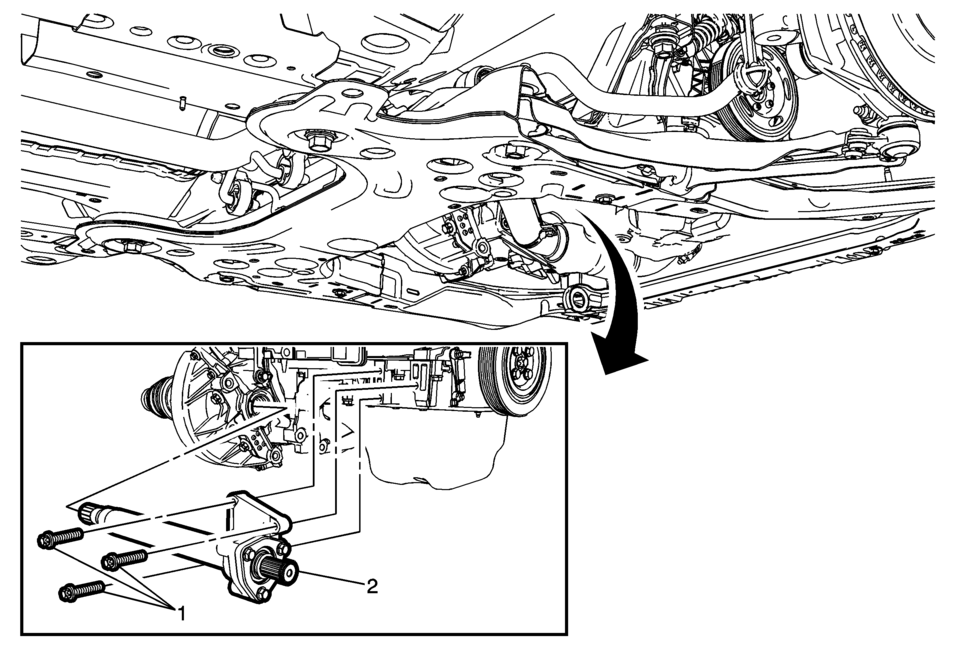
|
Callout |
Component Name |
|---|---|
Preliminary Procedure
|
|
|
1 |
Front Wheel Drive Intermediate Shaft Bracket Bolt (Qty: 3) Caution: Refer to Fastener Caution.
22 Y (16 lb ft) |
|
2 |
Front Wheel Drive Intermediate Shaft Procedure
Check the transmission fluid level and fill to the proper level, if needed. Refer to Transmission Fluid Level and Condition Check. |
 Front Camber Adjustment
Note: DO NOT grind the front strut bores for the bolts to allow
adjustment of the front camber. There are service bolts available to allow
the front camber to be adjusted, if need ...
 Front Wheel Drive Shaft Inner Joint and Boot Replacement
Special Tools
DT-35910 Drive Axle Boot Clamp Pliers
For equivalent regional tools, refer to Special Tools.
Disassemble Procedure
Note: There are types of inner joints available. If ...
Other materials:
Front Bumper Fascia Opening Lower Cover Replacement
Front Bumper Fascia Opening Lower Cover Replacement
Callout
Component Name
1
Front Bumper Fascia Opening Lower Cover Push-In Retainer
2
Front Bumper Fascia Opening Lower Cover Bolt (Qty:?ۉ ...
Liftgate Trim Finish Panel Replacement (Hatchback)
Liftgate Trim Finish Panel Replacement
Callout
Component Name
1
Liftgate Trim Finish Panel Fastener
Caution: Refer to Fastener Caution.
2
Liftgate Trim Finish Panel Retainer (Qty: ...
Engine Oil Cooler Replacement
Removal Procedure
Disconnect battery negative cable. Refer to Battery Negative Cable Disconnection
and Connection.
Drain engine coolant. Refer to Cooling System Draining and Filling
Remove the turbocharger oil feed pipe. Refer to Turbocharger Oil Feed
Pipe Replacement ...

0.0073