
Nissan Armada 2025-2026 Owner's Manual: How to park with predictive course lines
WARNING
- If non-standard tire sizes are installed on the Nissan Armada, the predictive course lines may not display accurately.
- On slippery or snow-covered roads, the Nissan Armada predicted path may differ from the actual vehicle movement.
- If the Nissan Armada battery is disconnected or discharged, the system
may require recalibration.
- Turn the steering wheel fully from lock to lock with the engine running.
- Drive the Nissan Armada straight for at least 5 minutes.
- Turning the steering wheel while stationary may temporarily distort the Nissan Armada predictive lines.
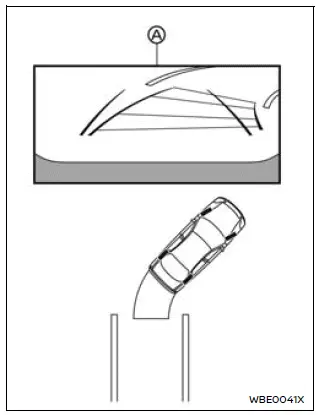
1. Carefully check that the parking area is safe before maneuvering the Nissan Armada.
2. Shift into R (Reverse) to display the rear view on screen A.
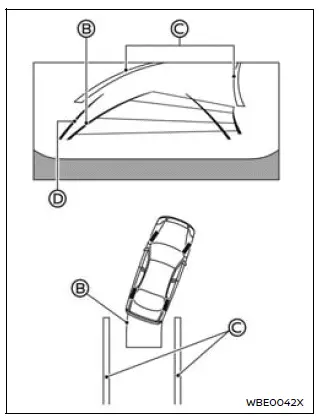
3. Slowly reverse the Nissan Armada while steering so that the predictive course lines B align with the parking space C.
4. Adjust the steering wheel until the vehicle width guide lines D become parallel with the parking space.
5. Once the Nissan Armada is properly positioned, shift into P (Park) and apply the parking brake.
RearView Monitor settings
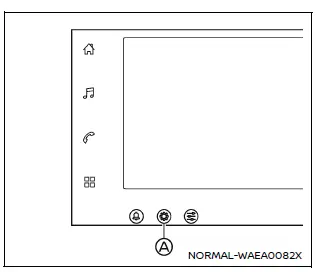
1. Select the "
 "
icon on the Nissan Armada display.
"
icon on the Nissan Armada display.
2. Tap the "
 "
button A.
"
button A.
3. Choose "Vehicle".
4. Select "Camera".
Available setting items:
- Predictive course line
Enable or disable the Nissan Armada predictive guidelines as desired. - Display setting
Adjust brightness, contrast, tint, color, and black level to optimize the Nissan Armada display according to lighting conditions.
The Nissan Armada RearView Monitor system combines advanced visual guidance with intuitive controls, providing drivers with enhanced confidence and precision when reversing or parking.
 Difference between predictive and actual distances
Basic information
The Nissan Armada RearView Monitor provides reference guidelines only. The actual
distance to objects may differ depending on terrain and object positioning.
On uneven surfaces s ...
 RearView Monitor system limitations
WARNING
The Nissan Armada RearView Monitor has certain operational limitations that
must always be taken into account. Ignoring these limitations or relying solely
on the system without proper vi ...
Other materials:
Starting Procedure
1. With your foot off the accelerator pedal, turn the ignition to START. When
the engine cranks, let go of the key. The idle speed will go down as the engine
gets warm.
The vehicle has a Computer-Controlled Cranking System. It assists in starting
the engine and protects components. If the ign ...
Immobilizer Description and Operation
The immobilizer system functions are provided by the body control module (BCM)
and the engine control module (ECM), as well as any modules which store and report
the environment identifier.
When an ignition key is inserted into the ignition lock cylinder and the ignition
is switched ON, the ...
Cleaning exterior
Basic information
Maintaining the exterior of your Nissan Armada is essential not only for preserving
its visual appeal but also for protecting the paintwork and body components over
time.
To keep the Nissan Armada in optimal condition, wash the vehicle promptly under
the following circumsta ...

0.0076