
Nissan Armada 2025-2026 Owner's Manual: Informational icons
The Nissan Armada driving recorder system uses a set of informational icons to clearly indicate its current operating status. These icons are displayed on the driving recorder screen and provide real-time feedback, allowing the driver to quickly understand system conditions without navigating through menus. This intuitive visual system enhances usability and ensures that the Nissan Armada driver remains informed at all times.
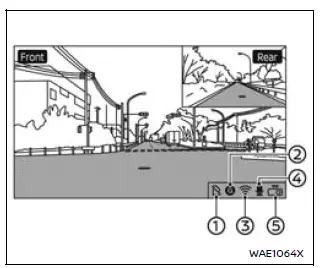
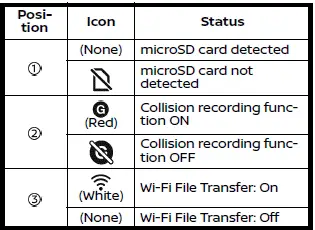
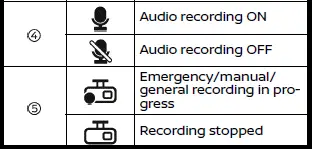
NOTE:
- If no icon appears in position 1 on the Nissan Armada display and recorded images or videos are not being saved, this may indicate that the microSD card does not have enough available storage space. In this case, it is recommended to delete unnecessary files to free up space.
- If
 is displayed, the microSD card in your Nissan Armada may be malfunctioning.
If formatting the card does not resolve the issue, replace it with a compatible
new microSD card.
is displayed, the microSD card in your Nissan Armada may be malfunctioning.
If formatting the card does not resolve the issue, replace it with a compatible
new microSD card. - If
 ,
,
 (gray), or
 (gray) is displayed, there may be a malfunction in the Nissan Armada vehicle
system or the driving recorder itself.
(gray) is displayed, there may be a malfunction in the Nissan Armada vehicle
system or the driving recorder itself.
In such cases, it is strongly recommended to have your Nissan Armada inspected by an authorized Nissan dealer to ensure proper system functionality and safety.
 Driving recorder system interface
Touch "
"
on the Launch Bar to access the applications menu.
Select the "Dash Cam" key to open the Nissan Armada driving recorder interface.
The "Dash Cam" shortcut ...
 File menu
The file menu in the Nissan Armada driving recorder system allows users to conveniently
manage all recorded content, including photos and video files. Through this interface,
you can view, organiz ...
Other materials:
Trim Height Inspection
Trim Height Measurement
Trim height is a predetermined measurement relating to vehicle ride height.
Incorrect trim heights can cause the vehicle to bottom out over bumps, damage
to the suspension components and symptoms similar to wheel alignment problems.
Check the trim heights wh ...
Ignition Transmission Lock Check
While parked, and with the parking brake set, try to turn the ignition to LOCK/OFF
in each shift lever position.
For automatic transmission vehicles, the ignition should turn to LOCK/OFF
only when the shift lever is in P (Park).
For manual transmission vehicles, the ignition should turn ...
Changing wheels and tires
Tire rotation
To maintain optimal performance and extend tire life on your Nissan Armada, it
is strongly recommended to rotate the tires at regular intervals of approximately
10,000 miles (16,000 km).
Consistent tire rotation helps ensure even tread wear, improves ride comfort,
and contr ...

0.0062