
Chevrolet Sonic Repair Manual: Manual Transmission Shift Lever and Selector Lever Cable Adjustment
- Remove the floor console. Refer to Front Floor Console Replacement.
- Lift upward and disengage (do not remove) both cable lock adjusters (1) to release the internal cable assembly, one for each side.
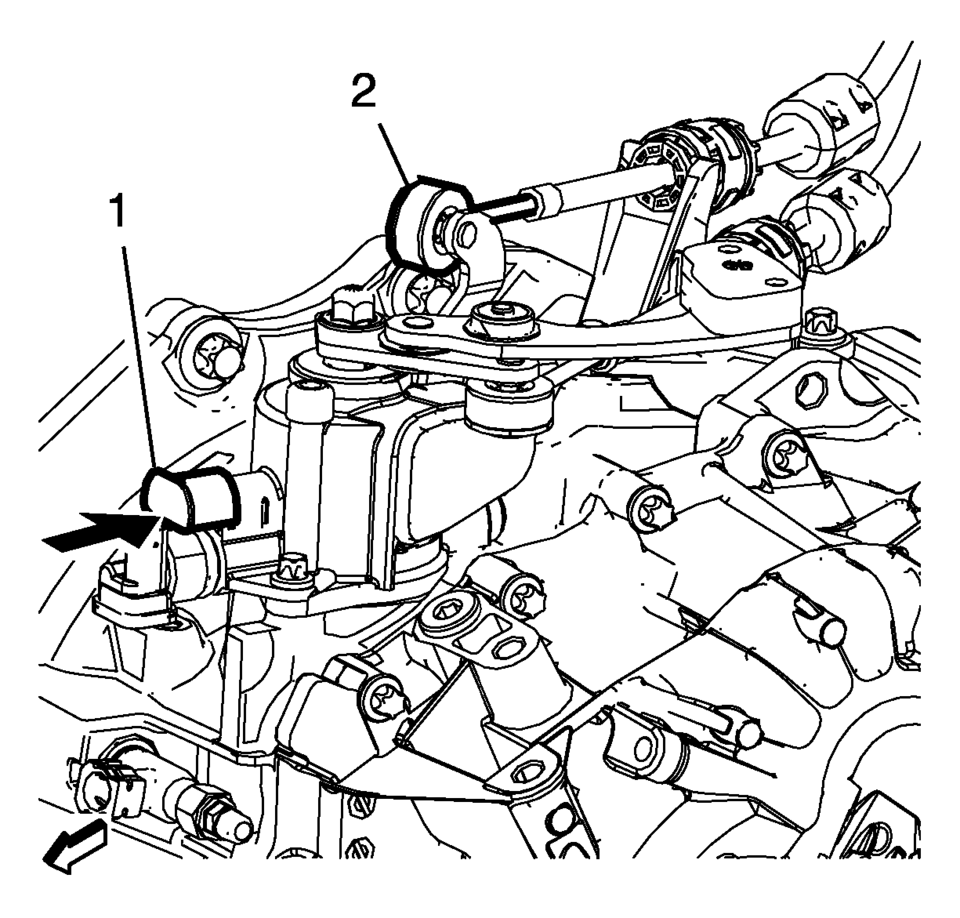
- Block the shift control housing, push the selector lever (2) backwards and push (arrow) the blocking device (1) towards the shift control housing.
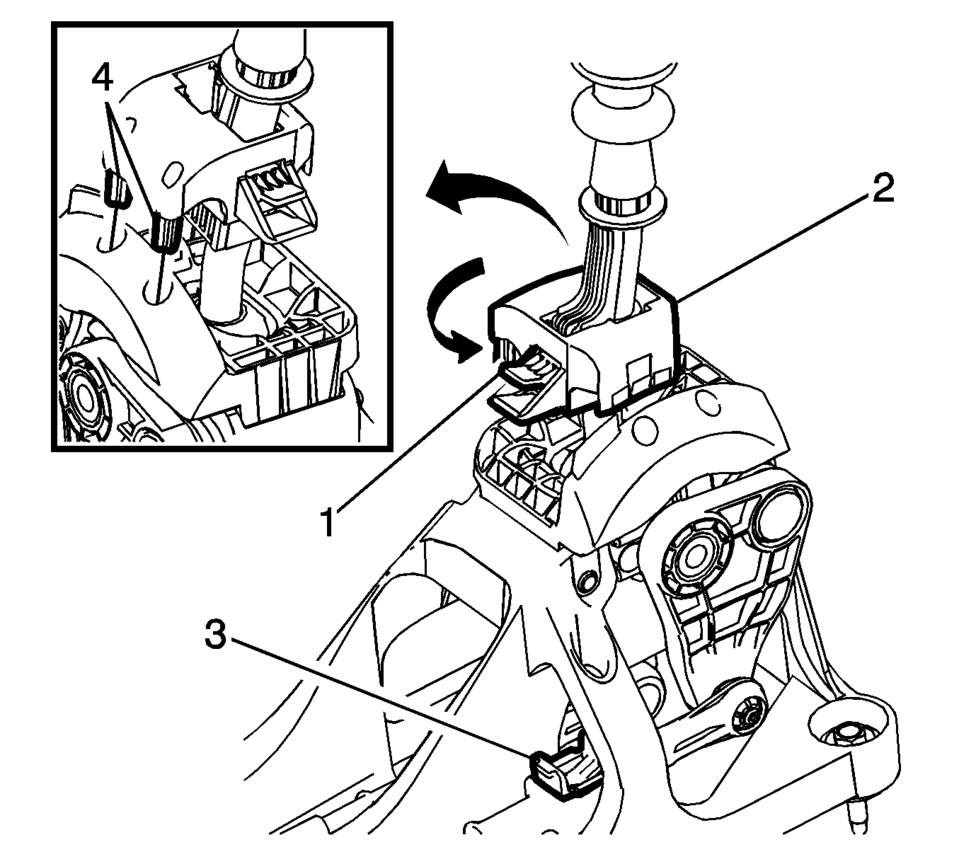
- lock the position of the shift control lever by rotating the reverse lockout device with the following instructions:
- Push down on tab (1) and pull up on device (2) to release from installed position.
- Rotate device 180 degrees so tab (1) is in the rear of the shift control assembly.
- Secure integral pins (4) in holes located on shifter base by pushing down device (2).
- Secure adjuster locks (3) by pushing down until locked. One for each cable.
- Reposition the reverse lockout device with the following instructions:
- Push down on tab (1) and pull up on device (2) to release from installed position.
- Rotate device (2) 180 degrees so tab (1) is in the front of the shift control assembly.
- Push downward on the reverse lockout device (2) until tab (1) snaps into detent.
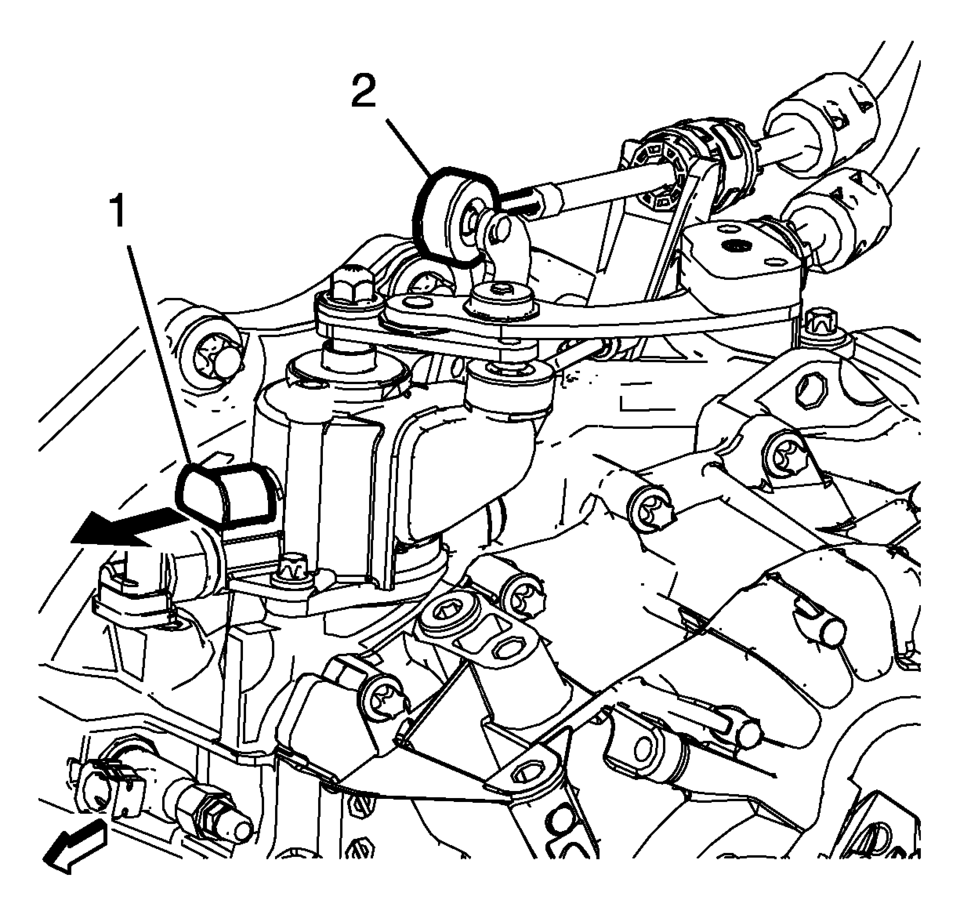
- Unblock the shift control housing, push slightly the selector lever (2) backwards and pull (arrow) the blocking device away from the shift control housing.
- Install the floor console. Refer to Front Floor Console Replacement.
- Verify correct operation of the transmission control assembly.

Note:
The hole of the transmission gear control (2) must be aligned to the hole in the base so the pin (1) can pass thru both. The transmission gear control will be locked in the 1? neutral position.
Note:
During this procedure DO NOT touch or preload the fixed shift lever as this may cause mis-adjustment to the shift system.
Note:
When unblocking the blocking device (1) a defined snap noise should be audible, a snap effect should be felt.
 Automatic Transmission Range Selector Lever Replacement
Removal Procedure
Set the park brake and chock the wheels.
Disconnect the transmission range selector lever cable
terminal (1) from the transmission manual shift leve ...
 Manual Transmission Shift Lever and Selector Lever Cable Replacement
Removal Procedure
Remove the battery tray. Refer to
Battery Tray Replacement.
\i
Disconnect the shift lever and selector cable ends (1)
from the transmission s ...
Other materials:
Instrument Panel Knee Bolster Replacement
Instrument Panel Knee Bolster Replacement
Callout
Component Name
Preliminary Procedures
Disable the SIR system. Refer to SIR Disabling and Enabling.
Remove the driver inflatable restraint instrument panel lower module.
...
Inflatable Restraint Module Handling and Scrapping
Special Tools
EL-38826 SIR Deployment Harness
EL-39401-B SIR Deployment Fixture
For equivalent regional tools, refer to Special Tools.
Live and Undeployed Air Bag
Warning: Refer to SIR Inflator Module Handling and Storage Warning.
Take special care when handling or s ...
Fuel Tank Filler Pipe Replacement
Removal Procedure
Remove the bracket fastener (1).
Lift and support the vehicle. Refer to Lifting and Jacking the Vehicle.
Remove the fuel tank filler pipe bracket fastener (1).
Disconnect the vent hose (2). Refer to Plastic Collar Quick C ...

0.0152