
Chevrolet Sonic Repair Manual: Oil Pan Cleaning and Inspection
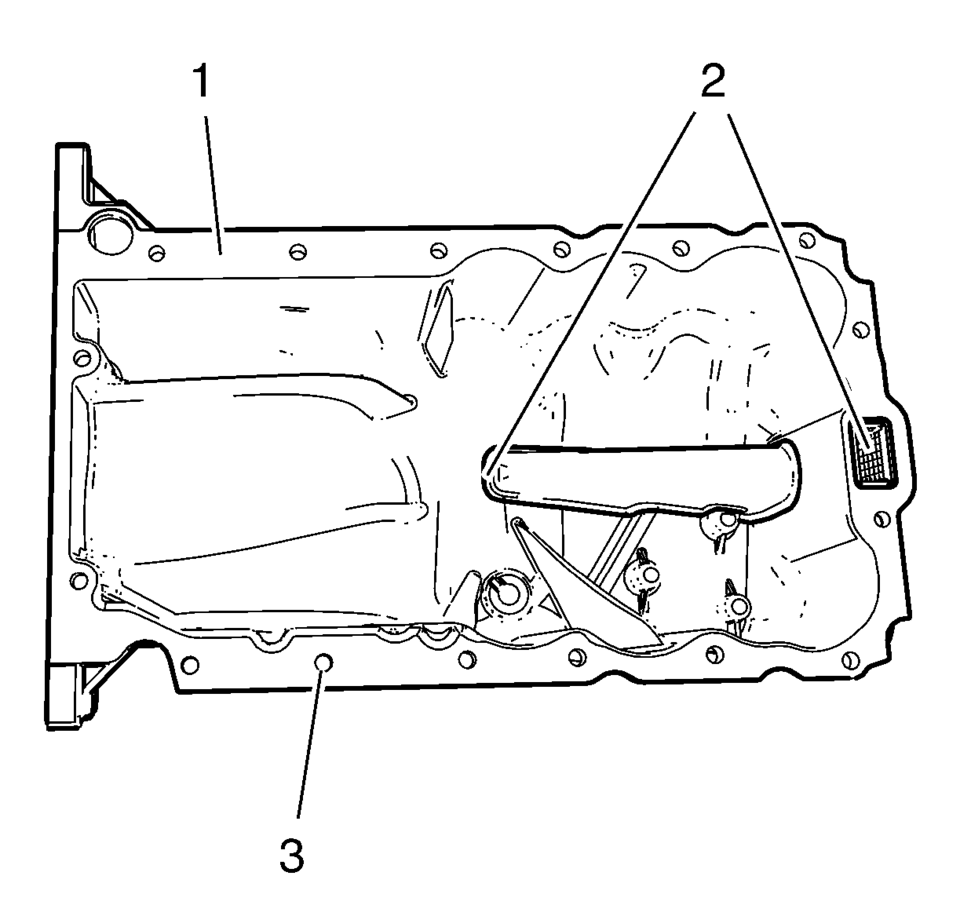
- Clean the oil suction gallery (2) with compressed air. Be sure to remove all dirt and old gasket material from the suction gallery (2).
- Remove all remaining old gasket material from sealing surface (1) and screw bores (3).
- Clean the sealing surfaces from dirt and grease.
- Inspect the sealing surface for cracks and damage.
Warning:
Wear safety glasses when using compressed air in order to prevent eye injury.
Caution:
To ensure proper engine lubrication, clean clogged or contaminated oil galleries in an approved solvent and with compressed air. Failure to clean oil galleries may cause engine damage.
 Oil Sump/Pan
...
 Oil Pan Installation
Special Tools
EN-49980 Guidance Pins
For equivalent regional tools, refer to Special Tools.
Clean the sealing surfaces from old sealing material, dirt, oil and grease.
Note: The seal ...
Other materials:
Radiator Grille Emblem/Nameplate Replacement
Radiator Grille Emblem/Nameplate Replacement
Callout
Component Name
Preliminary Procedure
Remove the front bumper fascia. Refer to Front Bumper Fascia Replacement.
Remove the front bumper energy absorber. Refer to Front Bu ...
Instrument Panel Lower Compartment Replacement
Instrument Panel Lower Compartment Replacement
Callout
Component Name
Preliminary Procedure
Open the instrument panel lower compartment to the full open position.
Disconnect the instrument panel compartment dampener from t ...
3-5-Reverse and 4-5-6 Clutch Housing, and Input, Reaction, and Output Carrier
Installation
3-5-Reverse and 4-5-6 Clutch Housing, and Input, Reaction, and Output
Carrier Installation
Callout
Component Name
1
3? Reverse and 4?? Clutch Housing Thrust Bearing
2
2? Clutch Apply Plate ...

0.0072