
Chevrolet Sonic Repair Manual: Radio Antenna Base Replacement
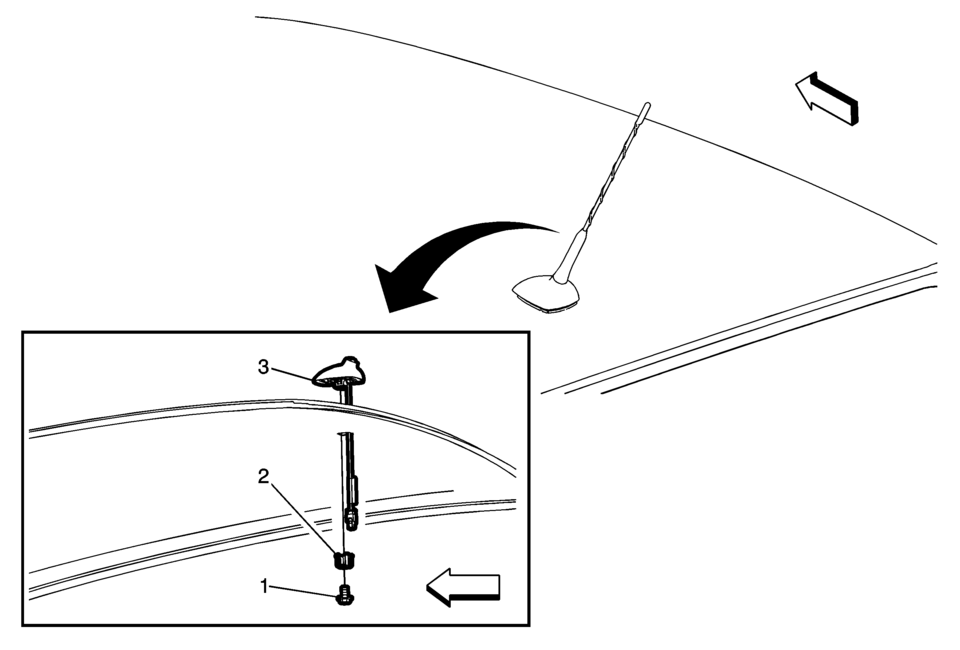
|
Callout |
Component Name |
|---|---|
|
Preliminary Procedure
Lower the rear of the headlining trim panel. Refer to Headlining Trim Panel Replacement. |
|
|
1 |
Radio Antenna Base Fastener Caution: Refer to Fastener Caution.
9 Y (80 lb in) |
|
2 |
Radio Antenna Base Retainer |
|
3 |
Radio Antenna Base Assembly Procedure
Disconnect the electrical connectors. |
 OnStar Description and Operation
This OnStar® system consists of the following components:
Telematics communication interface control module
OnStar® three button assembly
Microphone
Cellular antenna
Navigation antenna
...
 Radio Antenna Replacement
Radio Antenna Replacement
Callout
Component Name
1
Radio Antenna
Procedure
Rotate the mast counterclockwise in or ...
Other materials:
Connecting and Controlling a USB Drive
The infotainment system can only play back.mp3 and.wma files from a USB drive.
Only the first 2,500 songs are recognized on the device.
When a device is not supported, the message “No supported data found. You can
safely disconnect the device� appears.
Connecting a USB Drive
Connect the US ...
Engine Mount Bracket Installation
Install the engine mount bracket (2).
Caution: Refer to Fastener Caution.
Install the 3 engine mount bracket bolts and tighten to 60 Y (45 lb ft) + 45?E0°.
...
Control Solenoid Valve and Transmission Control Module Assembly Installation
Control Solenoid Valve and Transmission Control Module Assembly Installation
Callout
Component Name
1
Control Solenoid Valve Assembly Filter Plate
Caution: Use care when removing or installing the filter plate
...

0.0055