
Chevrolet Sonic Repair Manual: Timing Belt Rear Cover Removal
- Remove and DISCARD the 4 timing belt rear cover bolts (2).
- Remove the timing belt rear cover (1).
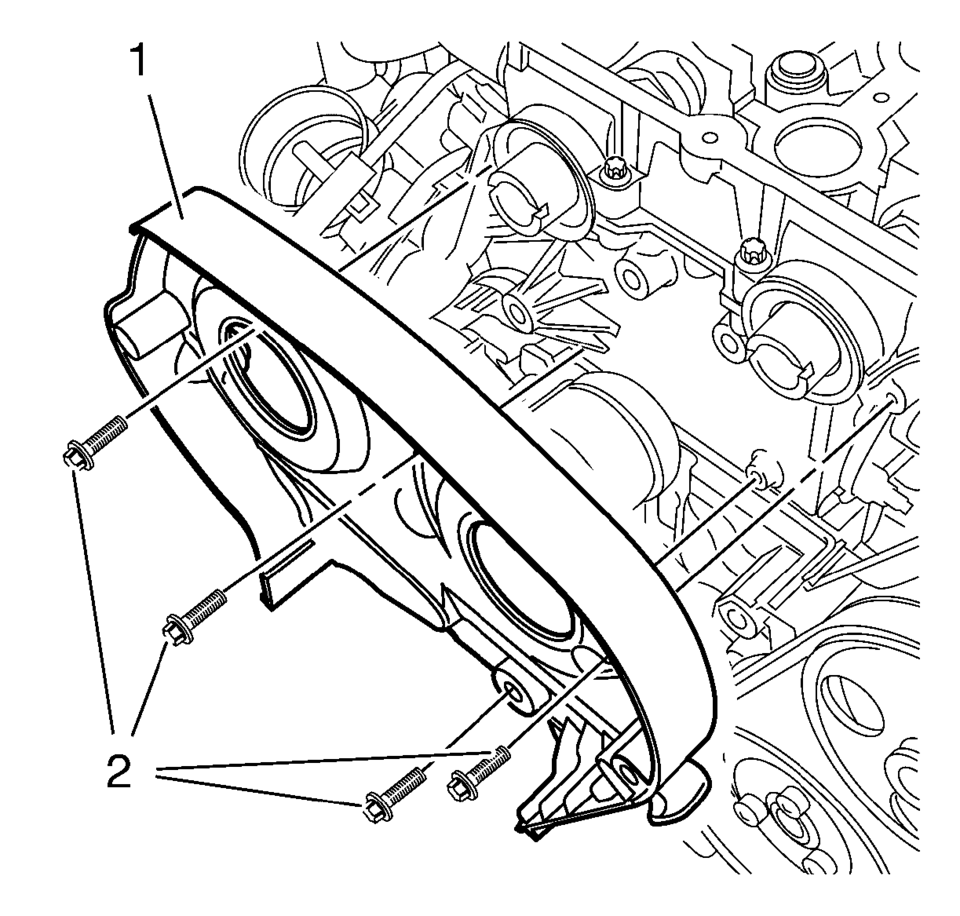
 Timing Belt Rear Cover Installation
Re-cut the 4 rear timing belt cover threads.
Install the timing belt rear cover (1).
Caution: Refer to Fastener Caution.
Note: Service may offer bolts that are n ...
 Timing Belt Rear Cover Replacement
Timing Belt Rear Cover Replacement
Callout
Component Name
Preliminary Procedures
Remove the camshaft sprocket. Refer to Camshaf ...
Other materials:
Instrument Panel Lower Compartment Replacement
Instrument Panel Lower Compartment Replacement
Callout
Component Name
Preliminary Procedure
Open the instrument panel lower compartment to the full open position.
Disconnect the instrument panel compartment dampener from t ...
Floor Air Outlet Duct Replacement - Left Side (LHD)
Floor Air Outlet Duct Replacement - Left Side
Callout
Component Name
Preliminary Procedure
Remove the instrument panel insulator, if equipped.
Remove the instrument panel lower trim pad cover. Refer to Instrument
Panel Low ...
Drive Range, Sixth Gear (Gen 2)
As vehicle speed increases, the transmission control module (TCM) processes input
signals from the automatic transmission input and output speed sensors, the throttle
position sensor and other vehicle sensors to determine the precise moment to command
ON the normally-low 26 pressure control so ...

0.0058