
Nissan Armada 2025-2026 Owner's Manual: About microSD card
WARNING
Never allow children to handle or play with the microSD card used in your Nissan Armada. Due to its small size, accidental swallowing may occur, which can lead to choking, serious injury, or even life-threatening situations.
NOTE:
If the microSD card is removed from the Nissan Armada driving recorder during recording or playback, stored data may become corrupted or permanently lost.
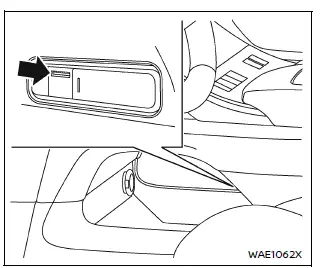
In the Nissan Armada, the microSD card slot is conveniently located in the lower console tray beneath the center console, allowing easy access for installation, removal, and maintenance.
- All videos and still images captured by the Nissan Armada driving recorder are stored directly on the microSD card inserted into this slot.
- Data may not be saved correctly in the following situations:
- If the microSD card is initialized using a device other than the Nissan Armada system
- If files from external devices are mixed with files recorded by the Nissan Armada
- If recorded file names are modified manually
- If a non-compatible or unsupported microSD card is used instead of the recommended one
- If the microSD card is not inserted properly into the slot
About copyright
- Unauthorized copying, distribution, public performance, or rental of copyrighted content recorded by the Nissan Armada driving recorder is strictly prohibited by law.
- Except for personal use, any recorded videos or images must not be used without obtaining permission from the respective rights holders. In some cases, even personal use may be subject to legal restrictions.
- Avoid recording or sharing images of individuals without their consent, as this may violate privacy or portrait rights.
- Improper or malicious use of the Nissan Armada driving recorder that causes public disturbance may result in legal consequences under applicable regulations.
 Basic information
The Nissan Armada driving recorder system is designed to capture high-quality
video and photo footage from both the front and rear of the vehicle, providing an
additional layer of safety, document ...
 Driving recorder system interface
Touch "
"
on the Launch Bar to access the applications menu.
Select the "Dash Cam" key to open the Nissan Armada driving recorder interface.
The "Dash Cam" shortcut ...
Other materials:
Instrument Panel Illumination Control
This feature controls the brightness of the instrument panel controls and infotainment
display screen. The thumbwheel is to the left of the steering column on the instrument
panel.
(Instrument Panel Brightness): Move
the thumbwheel up or down and hold, to brighten or dim the instrument pane ...
Radio Antenna Replacement
Radio Antenna Replacement
Callout
Component Name
1
Radio Antenna
Procedure
Rotate the mast counterclockwise in order to release the mast from the
antenna base.
...
Charge Air Cooler Inlet Air Hose Replacement
Removal Procedure
Disconnect the battery negative cable. Refer to Battery Negative Cable
Disconnection and Connection.
Remove the front bumper fascia. Refer to Front Bumper Fascia Replacement.
Loosen the charge air cooler inlet air pipe clamp (1) at the ...

0.0075