
Nissan Armada 2025-2026 Owner's Manual: In Car Camera menu
The Nissan Armada In-Car Camera system allows you to capture video and photos inside the vehicle cabin, making it an excellent tool for recording memorable family trips, monitoring passengers, or documenting important moments during your journey. This feature enhances the overall driving experience in the Nissan Armada by combining convenience, safety awareness, and entertainment functionality.
All photos and recorded videos captured using the Nissan Armada in-car camera can be easily accessed, reviewed, or deleted through the "File Menu", ensuring simple and efficient content management directly from the vehicle’s touchscreen display.
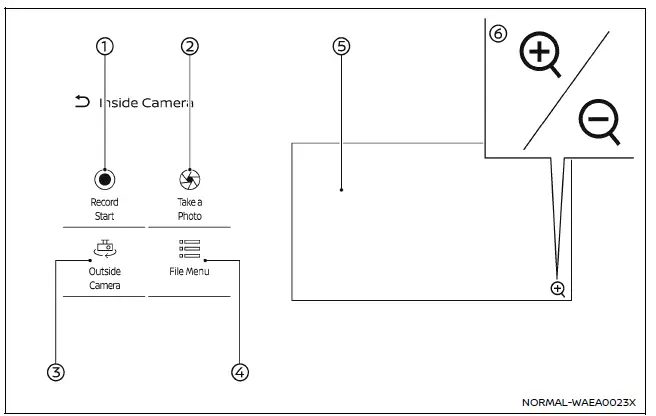
- Record Start
Touch to manually start or stop recording inside the Nissan Armada cabin.Take a Photo
Touch to capture and save a still image from the in-car camera screen. - Outside Camera/Inside Camera
Switch between external and internal camera views to monitor surroundings or passengers inside the Nissan Armada. - File Menu
Access stored photos and videos. See the "File menu" section for more details. - In Car Camera screen
The driver can view the second-row seating area through the touchscreen display, helping monitor passengers and enhance safety inside the Nissan Armada. - Zoom icon
Touch to enable or disable zoom functionality, allowing a closer view of rear-seat passengers when needed.
NOTE:
For safety reasons, the Nissan Armada does not allow continuous display of the camera screen while driving. However, the "Record Start" and "Take a Photo" functions remain available during vehicle operation.
Driving recorder settings
Touch
 to open the driving recorder settings menu and customize system preferences according
to your needs.
to open the driving recorder settings menu and customize system preferences according
to your needs.
The Nissan Armada driving recorder system can be connected to a smartphone via Wi-Fi using a dedicated mobile application. This allows users to conveniently access, review, and download recorded files directly to their mobile devices.
The official app for the Nissan Armada driving recorder can be downloaded from Google Play (Android) or the App Store (iOS).
Google/Android/Google Play
Google, Android, Google Play, and related trademarks are the property of Google LLC.
App Store
Apple and the Apple logo are trademarks of Apple Inc., registered in the U.S. and other countries. App Store is a service mark of Apple Inc.
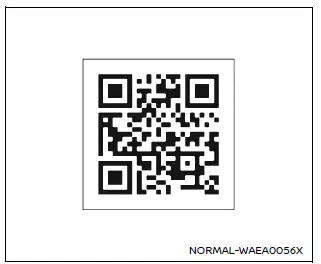
App download
- App name: NISSAN Intelligent Dash Cam
- Default Wi-Fi name: dvr_ssid
- Default Wi-Fi password: dvr_pass
If you forget the Wi-Fi password or encounter connection issues, you can reset the Nissan Armada driving recorder system by navigating to the "System" menu and selecting "Reset All Dash Cam Settings to Default".
NOTE:
- If the recording function is disabled during initial setup, initialize the Nissan Armada driving recorder system to activate all features properly.
- Formatting or initializing the microSD card will erase all stored data. It is highly recommended to back up important recordings before performing this action.
Features available in MyNISSAN app
The Nissan Armada mobile integration provides additional convenience, allowing users to manage recordings, monitor system status, and enhance overall usability through the dedicated app, making the Nissan Armada driving recorder system even more powerful and user-friendly.
Using the MyNISSAN app, Nissan Armada owners can remotely capture photos through the vehicle’s built-in driving recorder cameras, adding an extra layer of convenience and control even when away from the vehicle. This advanced functionality allows users to stay connected with their Nissan Armada at all times, enhancing both usability and peace of mind.
In addition, the Nissan Armada driving recorder system is capable of detecting unexpected events such as impacts, attempted break-ins, or unauthorized access. When such activity is detected, the system automatically sends notifications along with captured images directly to the MyNISSAN app, allowing the owner to quickly assess the situation and take appropriate action.
Radio approval information
This Nissan Armada device complies with Part 15 of the FCC Rules. Operation is subject to the following two conditions:
(1) This device may not cause harmful interference, and (2) this device must accept any interference received, including interference that may result in undesired operation.
This transmitter must not be co-located or operated simultaneously with any other antenna or transmitter within the Nissan Armada system.
This equipment complies with FCC radiation exposure limits established for an uncontrolled environment and adheres to FCC radio frequency (RF) exposure guidelines.
For safe operation, the Nissan Armada system should be installed and used in a way that maintains a minimum distance of at least 20 cm between the device and any part of the human body.
FCC CAUTION
Any changes or modifications to the Nissan Armada system that are not expressly approved by the party responsible for compliance may void the user’s authority to operate this equipment.
NOTE:
This Nissan Armada device contains license-exempt transmitter(s) and receiver(s) that comply with Innovation, Science and Economic Development Canada (ISED) regulations. Operation is subject to the following conditions:
1. This device may not cause interference.
2. This device must accept any interference, including interference that may cause undesired operation of the device.
L'émetteur/récepteur sans licence intégré dans ce système Nissan Armada est conforme aux normes CNR d'Innovation, Sciences et Développement économique Canada applicables aux dispositifs radio exempts de licence. Son utilisation est soumise aux conditions suivantes :
1. L'appareil ne doit pas causer de brouillage;
2. L'appareil doit accepter tout brouillage radioélectrique, même si celui-ci peut perturber son fonctionnement.
This Nissan Armada equipment complies with ISED radiation exposure limits defined for an uncontrolled environment and meets RSS-102 requirements for RF exposure.
This equipment must be installed and operated with a minimum distance of 20 cm between the radiator and the user’s body.
Cet équipement Nissan Armada est conforme aux limites d’exposition aux rayonnements établies pour un environnement non contrôlé et respecte les normes CNR-102 relatives à l’exposition aux fréquences radio (RF).
Il doit être installé et utilisé en maintenant une distance minimale de 20 cm entre le dispositif et le corps humain.
The Nissan Armada integration with mobile technology and regulatory compliance ensures not only advanced functionality but also adherence to international safety and communication standards, making it a reliable and modern solution for connected driving.
 File menu
The file menu in the Nissan Armada driving recorder system allows users to conveniently
manage all recorded content, including photos and video files. Through this interface,
you can view, organiz ...
 Antenna
Window antenna
In the Nissan Armada, the window antenna is seamlessly integrated into the rear
side glass, specifically within the third-row seat window. This design ensures reliable
signal recep ...
Other materials:
Rear Window Wiper/ Washer
If equipped with the rear wiper/ washer, the controls are on the end of the windshield
wiper lever.
ON: Press the upper portion of the button for continuous rear window wipes.
OFF: The rear wiper turns off when the button is returned to the middle position.
INT (Intermittent Rear Wipes): Pres ...
Driver or Passenger Seat Cushion Frame Replacement
Driver or Passenger Seat Cushion Frame Replacement
Callout
Component Name
Preliminary Procedures
Remove the driver or passenger seat. Refer to Driver or Passenger
Seat Removal and Installation
Remove the front seat cushio ...
Air Conditioning (A/C) Refrigerant Pressure Sensor Replacement (LUV)
Air Conditioning (A/C) Refrigerant Pressure Sensor Replacement
Callout
Component Name
1
Air Conditioning Refrigerant Pressure Sensor
Caution: Refer to Fastener Caution.
Procedures
Disconnect the air c ...

0.0105